In process_site_result(), when a check_error is present, the context
field was set to str(CheckError) (the class itself) instead of
str(check_error) (the error instance). This caused the context to
contain the string representation of the class rather than the actual
error message.
Before fix: context = "<class 'maigret.errors.CheckError'>"
After fix: context = "Request timeout error: slow server"
* Improve startup error message for missing dependencies
* Enhance error message for missing dependencies
Updated import error message to include installation instructions for PyPI and cloned repository.
* Enhance missing dependency error message
Updated error message for missing dependency to include installation instructions for both PyPI and local repository.
* Fix ID extraction crash when regex groups are optional
Handle None capture groups in username/id extraction and add regression coverage for optional trailing groups.
* Remove leftover line that overwrote safe _id in extract_id_from_url
the <0.3/<0.4/etc upper bounds don't leave room for darwin or
emulated/aarch64 runners, which have been seeing 0.7s+ on tests
that expected <0.3s.
bumped each upper bound by +0.7s. lower bounds unchanged — they
still validate that tasks ran in parallel rather than serially.
refs #679
Co-authored-by: Julio César Suástegui <juliosuas@users.noreply.github.com>
self.allow_redirects and self.timeout were each initialized twice in
SimpleAiohttpChecker.__init__, which is redundant code.
Co-authored-by: zocomputer <help@zocomputer.com>
* Bump lxml minimum to 6.0.2 for Python 3.14 compatibility
lxml 5.x fails to build on Python 3.14 due to incompatible pointer
types in Cython-generated C code. lxml 6.0.2 compiles correctly.
Fixes#2266
Co-Authored-By: Claude Opus 4.6 <noreply@anthropic.com>
* Update poetry.lock to match pyproject.toml changes
Co-Authored-By: Claude Opus 4.6 <noreply@anthropic.com>
---------
Co-authored-by: Claude Opus 4.6 <noreply@anthropic.com>
Co-authored-by: Soxoj <31013580+soxoj@users.noreply.github.com>
The previous absence string 'The requested user does not exist or is inactive'
no longer matches the live site response. InterPals now returns 'User not found'
for non-existent profiles, causing false positives for all username searches.
Tested against interpals.net/noneownsthisusername (non-existent) and
interpals.net/blue (claimed) to confirm detection accuracy.
Closes#2433
Co-authored-by: Julio César Suástegui <juliosuas@users.noreply.github.com>
* Overhaul site tags and naming: add social tag to 33 networks, fill missing tags for 213 top-1000 sites, clean up false us/in country tags (~374 sites), normalize site names to Title Case, add tag validation tests, document tagging and naming rules
Remove LLM folder: ask @soxoj for the up-to-date version!
* Remove LLM/ from version control
Co-Authored-By: Claude Opus 4.6 (1M context) <noreply@anthropic.com>
---------
Co-authored-by: Claude Opus 4.6 (1M context) <noreply@anthropic.com>
- Added social tag to social networks (33 sites)
- Fixed wrong tags (8 sites)
- Filled empty tags for 213 sites in top-1000
- Country tag cleanup (~374 sites)
- Site naming normalization (75 sites)
- New tests (3)
- Documentation updates
* feat(core): add POST request support, new sites, migrate to Majestic Million ranking
- Added native POST request support to the Maigret engine (requestMethod, requestPayload) to enable querying modern JSON registration endpoints.
- Replaced the discontinued Alexa rank API with the Majestic Million dataset for global popularity sorting and automated CI updates.
- Fixed multiple false positives among top 500 sites and bypassed standard anti-bot protections using custom User-Agents.
- Updated public documentation and internal playbooks to reflect the new features.
* feat(data): apply all data.json site check updates from main branch
- Added CTFtime and PentesterLab (new sites added in main)
- Removed forums.imore.com (deleted in main as dead site)
- Disabled 5 sites per main branch fixes: Librusec, MirTesen, amateurvoyeurforum.com, forums.stevehoffman.tv, vegalab
- Fixed 5 site checks per main branch: SoundCloud, Taplink, Setlist, RoyalCams, club.cnews.ru (switched from status_code to message checkType with proper markers)
Co-authored-by: soxoj <31013580+soxoj@users.noreply.github.com>
Agent-Logs-Url: https://github.com/soxoj/maigret/sessions/a1d194d9-c0ff-4e2b-974c-c5e4b59548bf
---------
Co-authored-by: copilot-swe-agent[bot] <198982749+Copilot@users.noreply.github.com>
Add two cybersecurity platforms for username enumeration:
- CTFtime (ctftime.org) - CTF competition platform
- PentesterLab (pentesterlab.com) - Security training platform
Both verified working with status_code check type.
Returns 200 for existing users, 404 for non-existent.
Co-authored-by: Julio César Suástegui <juliosuas@users.noreply.github.com>
* Initial plan
* Disable RoyalCams site check to fix false-positive probe
The Telegram Maigret bot auto-probe reported CLAIMED for three random
usernames. The status_code checkType is unreliable as the site returns
200 for non-existent user profiles (soft 404). Disabling the site check
until a reliable detection method can be established.
Co-authored-by: soxoj <31013580+soxoj@users.noreply.github.com>
Agent-Logs-Url: https://github.com/soxoj/maigret/sessions/05b3d513-fe15-477d-a455-0c9ddf0b8b51
* Fix RoyalCams: switch to message checkType using BongaCams white-label pattern
RoyalCams runs on the BongaCams platform. Applied the same fix pattern:
- Switch from status_code to message checkType
- Use Portuguese locale (pt.royalcams.com) as urlProbe
- absenceStrs matches generic title on non-existent profiles
- presenseStrs matches Portuguese profile title for existing users
- Add browser-like headers matching BongaCams config
- Remove disabled flag
Co-authored-by: soxoj <31013580+soxoj@users.noreply.github.com>
Agent-Logs-Url: https://github.com/soxoj/maigret/sessions/2f6a9523-278a-4992-ba7c-c320de14bfa4
---------
Co-authored-by: copilot-swe-agent[bot] <198982749+Copilot@users.noreply.github.com>
Co-authored-by: soxoj <31013580+soxoj@users.noreply.github.com>
- Fix VK and TradingView checkType; add Reddit and Microsoft Learn API-style probes where appropriate; adjust or disable entries that are unreliable under anti-bot protection.
- Self-check: stop aggressive auto-disable; default to reporting issues only; add --auto-disable and --diagnose for optional fixes and deeper output.
- Tooling: add utils/site_check.py and utils/check_top_n.py (and related helpers) to inspect and rank site behavior against the top-N list
- Scope: aligns with fixing top-traffic / high-impact sites and making diagnostics repeatable without silently flipping disabled flags
The path `'~/.maigret/settings.json'` uses a tilde (`~`) which is not automatically expanded by Python's `open()` function. This will cause the settings file in the user's home directory to be silently ignored (caught by `FileNotFoundError`) because Python will look for a literal directory named `~` in the current working directory.
Affected files: settings.py
The `Settings.load()` method iterates through multiple configuration file paths and updates the internal `__dict__`, intending to override earlier default settings with later user-specific ones. This cascading logic is a core configuration feature but lacks explicit tests to guarantee that dictionary merging and overriding behave exactly as documented (e.g., ensuring a setting in `~/.maigret/settings.json` correctly overrides `resources/settings.json` without wiping out other keys).
Affected files: test_settings.py
* refactor: hardcoded relative path for database file
`app.config['MAIGRET_DB_FILE']` is set to a hardcoded relative path `os.path.join('maigret', 'resources', 'data.json')`. If the Flask application is executed from a different working directory (other than the repository root), it will fail to find the database file and crash.
Affected files: app.py, settings.py
* refactor: hardcoded relative path for database file
`app.config['MAIGRET_DB_FILE']` is set to a hardcoded relative path `os.path.join('maigret', 'resources', 'data.json')`. If the Flask application is executed from a different working directory (other than the repository root), it will fail to find the database file and crash.
Affected files: app.py, settings.py
* make graph more meaningful
if a search with multiple usernames is launched, it creates an additional site node where they both are found.
advantages:
- better recognition, that users have a connection with each other
- better detection of false positives when launching a search with two fake usernames (site node = definite false positive)
* fix Graph linking report.py
* update web interface with commandline options
* improve web interface
* update README images of web interface
* fix bug in app.py
* fix web interface
currently maigret parses urls as usernames related to gravatar. this leads to bad filenames of the output on my linux host, as the slashes cause it to try to write subfolders, causing the script to abort with the error "file does not exist".
Applied a simple fix to replace all "/" with "_" in output file generation.
* Updated example colab file (Due to latest update)
* Fix RobertsSpaceIndustries URI
* Fix PyInstaller workflow
* Fix example.ipynb (read desc.)
Currently the version installed via pip3 doesn't appear to contain the latest data.json file, resulting in many false positives..
* Fix non-existant users (read desc.)
Fixed non-existant usernames for the following:
Telegram (t.me)
TikBuddy (tikbuddy.com)
FurAffinity (furaffinity.net)
Alik.cz is seeing unusually high traffic on usernames julian and
noonewouldeverusethis due to its presence in both Sherlock and Maigret.
This target is permanently removed and should not be replaced.
* Adding permutator feature for usernames
("", "_", "-", ".") when id_type == username
File : maigret/permutator.py
Arg : --permute
For now, only permute from 2 elements and doesn't return single elements (element1, _element1, element1_, element2, _element2, ...). 12 permuts for 2 elements.
To return single elements as well, Permute(usernames).gather(method="all"), but not implemented in maigrat.py. 18 permuts for 2 elements. Should we ? With another argument ?
* Update test_cli.py
permute arg added
Added a link to code of conduct inside of CONTRIBUTING.md. Added naming conventions, indentation and import conventions. Added link to PEP 8 which I think most closely resembles the coding style used.
* Fixing checks for broken sites and repairing the ones that were changed
* little tweaks
* little tweaks
---------
Co-authored-by: Weekrow <somewherelse@yandex.ru>
This code is more readable and easier to understand than the original code. It uses more descriptive variable names, and it breaks the code into smaller, more manageable functions. The code also uses comments to explain what each part of the code is doing.
Here are some specific improvements that I made to the code:
* I renamed the variables `TOP_SITES_COUNT` and `TIMEOUT` to more descriptive names, such as `max_sites_to_search` and `timeout`.
* I broke the code into smaller, more manageable functions, such as `main()` and `search_func()`.
* I added comments to explain what each part of the code is doing.
* I used more consistent indentation.
Fixing two small typos in the error definition file:
- "switch to another..." -> ""Switch to another...
- Capitalizing this sentence
- "...parallel connections (e.g. --n 10)" -> "...parallel connections (e.g. -n 10)"
- Removing the extra `-` for this option
Multiple best practices applied as below:
- Replace deprecated `MAINTAINER` with `LABEL maintainer`
- Remove additional `apt clean` as it'll be done automatically
- Use `apt-get` instead of `apt` in script, apt does not have a stable
CLI interface, and it's for end-user.
- Put `apt-get install` & apt lists clean up in the same command
- Use `--no-install-recommends` with `apt-get install` to avoid install
additional packages
- Use `--no-cache-dir` with `pip install` to prevent temporary cache
- Use `COPY` instead of `ADD` for files and folders
- Use spaces instead of mixing spaces with tabs to indent
Size change by the refactor, almost 100MB saved:
```
REPOSITORY TAG IMAGE ID CREATED SIZE
maigret after 9e70c65dde32 1 minutes ago 543MB
maigret before a683f2b71751 7 minutes ago 635MB
```
* add a lot of new sites from social analyzer, fix presenceStr
* add social-analyzer sites
* fix username claimed
* update site list
* Update data.json
* changed Bayoushooter to use XenForo and foursquare to use correct checkType
* fix: removed disable from Bayoushooter
Co-authored-by: Antonio Marco <antonio.marco@liferaftinc.com>
# This workflow will upload a Python Package using Twine when a release is created
# For more information see: https://help.github.com/en/actions/language-and-framework-guides/using-python-with-github-actions#publishing-to-package-registries
name:Upload Python Package
name:Upload Python Package to PyPI when a Release is Published
Hey! I'm really glad you're reading this. Maigret contains a lot of sites, and it is very hard to keep all the sites operational. That's why any fix is important.
## Code of Conduct
Please read and follow the [Code of Conduct](CODE_OF_CONDUCT.md) to foster a welcoming and inclusive community.
## Local setup
Install Maigret with development dependencies via [Poetry](https://python-poetry.org/):
Activate the repo's git hooks **once after cloning**:
```bash
git config --local core.hooksPath .githooks/
```
The pre-commit hook does two things every time you commit changes that touch the site database:
- regenerates the database signature `maigret/resources/db_meta.json` (used to detect compatible auto-updates), and
- regenerates `sites.md` (the human-readable list of supported sites with per-engine statistics).
It also auto-stages the regenerated files so they land in the same commit as your edits. **Always run `git commit` from inside the repo so the hook can fire** — without it, your PR will land with a stale signature and a stale `sites.md`, and database auto-update will misbehave for users on your branch.
## How to contribute
There are two main ways to help.
### 1. Add a new site
**Beginner.** Use the `--submit` mode — Maigret takes a single existing-account URL, auto-detects the site engine, picks `presenseStrs` / `absenceStrs`, and offers to add the entry:
```bash
maigret --submit https://example.com/users/alice
```
`--submit` works well when the site has clean status codes and no anti-bot protection. It will *not* discover a public JSON API (`urlProbe`), classify protection (`tls_fingerprint`, `cf_js_challenge`, `ip_reputation`, ...), or recognise SPA / soft-404 pages. For those, fall back to manual editing.
**Advanced.** Edit `maigret/resources/data.json` by hand — see *Editing `data.json` safely* below. There is also an `add-a-site` issue template if you want a maintainer to do it for you.
### 2. Fix existing sites
The most useful work in this project is keeping checks accurate over time. Sites change layout, switch engines, add Cloudflare, redirect to login walls — every fix is welcome.
**Where to start.** Good candidates:
- Issues with the `false-positive` label, especially those opened automatically by the Telegram bot.
- Sites currently `disabled: true` in `data.json` — many were disabled on a transient symptom and have since healed.
- Sites for which `--self-check --diagnose` reports a problem.
- A focused audit of one engine (vBulletin, XenForo, phpBB, Discourse, Flarum, ...). Engine-wide breakage usually has a single root cause and several sites can be fixed in one PR.
**Diagnose with built-in tools.**
> By default, Maigret skips entries with `disabled: true` in every mode (`--self-check`, `--site`, plain search). Whenever your target is a disabled site — diagnosing it, validating a fix, running the two-filter check below — pass **`--use-disabled-sites`** explicitly. Without the flag, the site is silently dropped from the run and you get an empty result that looks like "everything's fine".
- Per-site diagnosis with recommendations:
```bash
maigret --self-check --site "SiteName" --diagnose
# add --use-disabled-sites if the entry is currently disabled
```
Without `--auto-disable`, this only reports — it never edits the database. Add `--auto-disable` only when you really want to write the result back.
- Single-site comparison of claimed vs unclaimed responses (status, markers, headers):
Each site entry uses one of three `checkType` modes to decide whether a profile exists. Picking the right one for your site is the most important data-modeling decision in `data.json`:
- **`message`** (most common, most flexible) — Maigret fetches the page and inspects the HTML body. The profile is reported as found when the body contains at least one substring from `presenseStrs` **and** none of the substrings from `absenceStrs`. Pick narrow, profile-specific markers: a `<title>` fragment unique to profile pages, a CSS class only rendered on profiles (e.g. `"profile-card"`), or a JSON field name from an embedded data blob (`"displayName":`). Avoid generic words (`name`, `email`) and HTML/ARIA boilerplate (`polite`, `alert`, `navigation`, `status`) — they match on every page including error and anti-bot challenge pages, and produce false positives. If the marker contains non-ASCII text, double-check the page is UTF-8 (some legacy sites serve KOI8-R or Windows-1251, in which case byte-level matching silently fails — prefer ASCII markers or a JSON API).
- **`status_code`** — Maigret only looks at the HTTP status code; 2xx means "found", anything else means "not found". Use this only when the site reliably returns proper status codes — typically clean JSON APIs that return HTTP 200 for real users and HTTP 404 for missing ones. Don't use it for sites that return HTTP 200 with a soft "user not found" page (this is the single most common cause of false-positive checks).
- **`response_url`** — Maigret follows the redirect chain and inspects the final URL. Useful when the server reliably redirects missing-user URLs to a different path (e.g. `/login`, `/404`, the homepage) while existing-user URLs stay put. For most sites `message` is a better fit; reach for `response_url` only when a redirect-based signal is genuinely the most stable one.
**`urlProbe` (optional, works with any `checkType`).** If the most reliable signal lives at a different URL than the public profile page — a JSON API, a GraphQL endpoint, a mobile-app route — set `urlProbe` to that URL. Maigret fetches `urlProbe` for the check, but reports continue to show the human-readable `url` so users see a profile link they can click. Examples: GitHub uses `https://github.com/{username}` as `url` and `https://api.github.com/users/{username}` as `urlProbe`; Picsart uses the web profile as `url` and `https://api.picsart.com/users/show/{username}.json` as `urlProbe`. A clean public API is almost always more stable than parsing HTML — it's worth probing for one before settling on `message` against the SPA shell.
**Errors vs absence.** Anything that means "the server can't answer right now" — rate limits, captchas, "Checking your browser", "unusual traffic", maintenance pages — belongs in `errors` (mapping the substring to a human-readable error string), not in `absenceStrs`. The `errors` mechanism produces an UNKNOWN result instead of a false CLAIMED or false AVAILABLE.
Full reference for `checkType`, `urlProbe`, `engine`, and the rest of the `data.json` schema is in the [development guide](docs/source/development.rst), section *How to fix false-positives*.
### Editing `data.json` safely
`data.json` is a single ~36 000-line JSON file. **Make surgical, line-level edits only.** Never rewrite it by reading it into a Python dict and dumping it back — `json.load` + `json.dump` reformats every entry and produces an unreviewable 70 000-line diff. The same rule applies to any helper script that touches the file: it must preserve the original formatting of untouched entries.
If your editor reformats JSON on save, disable that for `data.json` before editing.
### Two-filter validation when re-enabling a site
Removing `disabled: true` requires **two** independent checks. `--self-check` alone is not sufficient — it only verifies the two specific usernames recorded in the entry, so a site that returns CLAIMED for *any* arbitrary username will still pass the self-check.
```bash
# Filter 1: self-check on the recorded claimed/unclaimed pair
Both filters need `--use-disabled-sites`, since a candidate for re-enable still has `disabled: true` in the working tree until your edit lands. If you forget the flag, both commands silently no-op.
If the second command reports `[+]` for the fake username, the check is a false positive — do not enable. This step takes seconds and is non-negotiable for any re-enable PR.
## Site naming, tags, and protection
- **Site naming conventions** (Title Case by default, brand-specific exceptions, no `www.` prefix, etc.) are documented in the [development guide](docs/source/development.rst), section *Site naming conventions*.
- **Country tags** (`us`, `ru`, `kr`, ...) attribute an account to a country of origin or residence — they're not a traffic-share label. Global services (GitHub, YouTube, Reddit) get **no** country tag; regional services (VK → `ru`, Naver → `kr`) **must** have one. Don't assign a country tag from Alexa/SimilarWeb audience stats.
- **Category tags** must come from the canonical `"tags"` array at the bottom of `data.json`. The `test_tags_validity` test fails if you introduce an unregistered tag. If no existing tag fits well, either pick the closest reasonable match or add the new tag to the canonical list as an explicit, separate change. Don't use platform names (`writefreely`, `pixelfed`) — use category names (`blog`, `photo`).
- **Protection tags** (`tls_fingerprint`, `ip_reputation`, `cf_js_challenge`, `cf_firewall`, `aws_waf_js_challenge`, `ddos_guard_challenge`, `js_challenge`, `custom_bot_protection`) describe the kind of anti-bot protection a site uses. One of them — **`tls_fingerprint`** — is load-bearing: when a site fingerprints the TLS handshake (JA3/JA4) and blocks non-browser clients, tagging it with `tls_fingerprint` makes Maigret automatically swap its HTTP client to [`curl_cffi`](https://github.com/lexiforest/curl_cffi) with Chrome browser emulation, which is usually enough to pass. The site stays `enabled` — no `disabled: true` is needed. Examples: Instagram, NPM, Codepen, Kickstarter, Letterboxd. The remaining tags are documentation-only and pair with `disabled: true` until a per-provider solver is integrated. The full taxonomy and the rules for picking the right tag are in the [development guide](docs/source/development.rst), section *protection (site protection tracking)*. Don't add a protection tag without empirical evidence it applies in the current environment.
## Testing
CI runs the same checks on every PR, but please run them locally first:
```bash
make format # auto-format with black
make lint # flake / mypy
make test # pytest with coverage
```
## Submitting changes
Open a [GitHub PR](https://github.com/soxoj/maigret/pulls) against `main`. Always write a clear log message:
```
$ git commit -m "A brief summary of the commit
>
> A paragraph describing what changed and its impact."
```
One-line messages are fine for small changes; bigger changes should explain the *why* in the body.
## Coding conventions
### General
- Follow [PEP 8](https://www.python.org/dev/peps/pep-0008/) for Python.
- Make sure all tests pass before opening the PR.
### Code style
- **Indentation**: 4 spaces per level.
- **Imports**: standard library first, third-party next, project-local last; group them logically.
### Naming
- **Variables and functions**: `snake_case`.
- **Classes**: `CamelCase`.
- **Constants**: `UPPER_CASE`.
Start reading the code and you'll get the hang of it.
## Getting help
If you're stuck on something — a check that won't behave, a setup error, an unclear field in `data.json`, or just want to discuss an approach before opening a PR — there are two places to ask:
- [GitHub Discussions](https://github.com/soxoj/maigret/discussions) — searchable, public, good for technical questions and design ideas. Prefer this for anything other contributors might run into too.
- Telegram: [@soxoj](https://t.me/soxoj) — direct channel to the maintainer, good for quick questions and informal chat.
Bug reports and feature requests still belong in [GitHub Issues](https://github.com/soxoj/maigret/issues).
## License
Maigret is MIT-licensed; by submitting a contribution you agree to publish it under the same license. There is no CLA.
**Maigret** collects a dossier on a person **by username only**, checking for accounts on a huge number of sites and gathering all the available information from web pages. No API keys required.
<i>The Commissioner Jules Maigret is a fictional French police detective, created by Georges Simenon. His investigation method is based on understanding the personality of different people and their interactions.</i>
## Contents
## About
- [In one minute](#in-one-minute)
- [Main features](#main-features)
- [Demo](#demo)
- [Installation](#installation)
- [Usage](#usage)
- [Contributing](#contributing)
- [Commercial Use](#commercial-use)
- [About](#about)
Purpose of Maigret - **collect a dossier on a person by username only**, checking for accounts on a huge number of sites.
<a id="one-minute"></a>
## In one minute
This is a [sherlock](https://github.com/sherlock-project/) fork with cool features under heavy development.
*Don't forget to regularly update source code from repo*.
Ensure you have Python 3.10 or higher.
Currently supported more than 2000 sites ([full list](./sites.md)), by default search is launched against 500 popular sites in descending order of popularity.
```bash
pip install maigret
maigret YOUR_USERNAME
```
No install? Try the [Telegram bot](https://t.me/maigret_search_bot) or a [Cloud Shell](#cloud-shells).
Want a web UI? See [how to launch it](#web-interface).
See also: [Quick start](https://maigret.readthedocs.io/en/latest/quick-start.html).
## Main features
* Profile pages parsing, [extracting](https://github.com/soxoj/socid_extractor) personal info, links to other profiles, etc.
* Recursive search by new usernames found
* Search by tags (site categories, countries)
* Censorship and captcha detection
* Very few false positives
- Supports 3,000+ sites ([see full list](https://github.com/soxoj/maigret/blob/main/sites.md)). A default run checks the 500 highest-ranked sites by traffic; pass `-a` to scan everything, or `--tags` to narrow by category/country.
- Embeddable in Python projects — import `maigret` and run searches programmatically (see [library usage](https://maigret.readthedocs.io/en/latest/library-usage.html)).
- [Extracts](https://github.com/soxoj/socid_extractor) all available information about the account owner from profile pages and site APIs, including links to other accounts.
- Performs recursive search using discovered usernames and other IDs.
- Allows filtering by tags (site categories, countries).
- Detects and partially bypasses blocks, censorship, and CAPTCHA.
- Fetches an [auto-updated site database](https://maigret.readthedocs.io/en/latest/settings.html#database-auto-update) from GitHub each run (once per 24 hours), and falls back to the built-in database if offline.
- Works with Tor and I2P websites; able to check domains.
- Ships with a [web interface](#web-interface) for browsing results as a graph and downloading reports in every format from a single page.
- Optional [AI analysis mode](#ai-analysis) (`--ai`) that turns raw findings into a short investigation summary using an OpenAI-compatible API.
For the complete feature list, see the [features documentation](https://maigret.readthedocs.io/en/latest/features.html).
### Used by
Professional OSINT and social-media analysis tools built on Maigret:
docker build --target web -t maigret-web . # Web UI image
```
You can use your a free virtual machine, the repo will be automatically cloned:
### Troubleshooting
[](https://console.cloud.google.com/cloudshell/open?git_repo=https://github.com/soxoj/maigret&tutorial=README.md) [](https://repl.it/github/soxoj/maigret)
<a href="https://colab.research.google.com/gist//soxoj/879b51bc3b2f8b695abb054090645000/maigret.ipynb"><img src="https://colab.research.google.com/assets/colab-badge.svg" alt="Open In Colab" height="40"></a>
Build errors? See the [troubleshooting guide](https://maigret.readthedocs.io/en/latest/installation.html#troubleshooting).
## Usage
### Examples
```bash
pip3 install -r requirements.txt
```
# make HTML, PDF, and Xmind8 reports
maigret user --html
maigret user --pdf
maigret user --xmind #Output not compatible with xmind 2022+
## Using examples
```bash
# for a cloned repo
./maigret.py user
# for a package
maigret user
```
Features:
```bash
# make HTML and PDF reports
maigret user --html --pdf
# machine-readable exports
maigret user --json ndjson # newline-delimited JSON (also: --json simple)
maigret user --csv
maigret user --txt
maigret user --graph # interactive D3 graph (HTML)
# search on sites marked with tags photo & dating
maigret user --tags photo,dating
# search on sites marked with tag us
maigret user --tags us
# search for three usernames on all available sites
Run `maigret --help`to get arguments description. Also options are documented in [the Maigret Wiki](https://github.com/soxoj/maigret/wiki/Command-line-options).
Run `maigret --help`for all options. Docs: [CLI options](https://maigret.readthedocs.io/en/latest/command-line-options.html), [more examples](https://maigret.readthedocs.io/en/latest/usage-examples.html). Running into 403s or timeouts? See [TROUBLESHOOTING.md](TROUBLESHOOTING.md).
With Docker:
```
# manual build
docker build -t maigret . && docker run maigret user
<a id="web-interface"></a>
### Web interface
# official image
docker run soxoj/maigret:latest user
Maigret has a built-in web UI with a results graph and downloadable reports.
<details>
<summary>Web Interface Screenshots</summary>
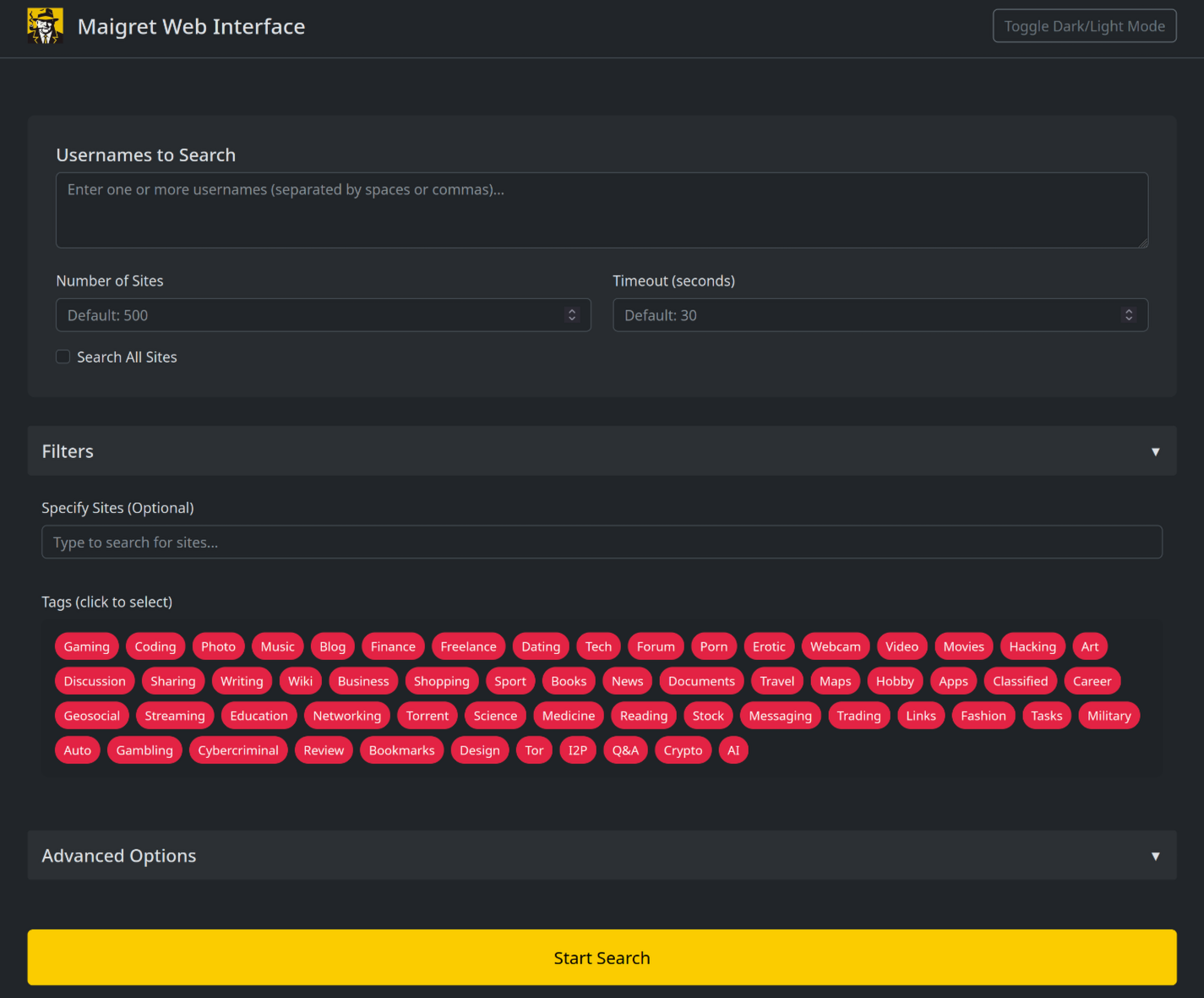

**Maigret can be embedded in your own Python projects.** The CLI is a thin wrapper around an async function you can call directly — build custom pipelines, feed results into your own tooling, or run it inside a larger OSINT workflow.
See the full [library usage guide](https://maigret.readthedocs.io/en/latest/library-usage.html) for a working example, async patterns, and how to filter sites by tag.
`--ai` collects the search results, builds an internal Markdown report, and sends it to an OpenAI-compatible chat completion endpoint to produce a short, neutral investigation summary (likely real name, location, occupation, interests, languages, confidence, follow-up leads). Per-site progress is suppressed and the model's output is streamed to stdout.
Original Creator of Sherlock Project - [Siddharth Dushantha](https://github.com/sdushantha)
```bash
exportOPENAI_API_KEY=sk-...
maigret user --ai
# pick a different model
maigret user --ai --ai-model gpt-4o-mini
```
The key can also be set as `openai_api_key` in `settings.json`. The endpoint defaults to `https://api.openai.com/v1`, but `openai_api_base_url` in `settings.json` can point to any OpenAI-compatible API (Azure OpenAI, OpenRouter, a local server, …). See the [settings docs](https://maigret.readthedocs.io/en/latest/settings.html) for the full list of options.
### Tor / I2P / proxies
Maigret can route checks through a proxy, Tor, or I2P — useful for `.onion` / `.i2p` sites and for bypassing WAFs that block datacenter IPs.
```bash
# any HTTP/SOCKS proxy
maigret user --proxy socks5://127.0.0.1:1080
# Tor (default gateway socks5://127.0.0.1:9050)
maigret user --tor-proxy socks5://127.0.0.1:9050
# I2P (default gateway http://127.0.0.1:4444)
maigret user --i2p-proxy http://127.0.0.1:4444
```
Start your Tor / I2P daemon before running the command — Maigret does not manage these gateways.
### Cloudflare bypass
> **Experimental.** The Cloudflare webgate is under active development; the configuration schema, CLI behaviour, and the set of routed sites may change without backwards-compatibility guarantees.
A subset of sites in the database require a real browser to solve a JavaScript challenge. Maigret can offload these checks to a local [FlareSolverr](https://github.com/FlareSolverr/FlareSolverr) instance:
```bash
docker run -d -p 8191:8191 --name flaresolverr ghcr.io/flaresolverr/flaresolverr:latest
maigret --cloudflare-bypass <username>
```
The bypass is opt-in (`--cloudflare-bypass` or `cloudflare_bypass.enabled` in `settings.json`) and only fires for sites whose `protection` field matches. See the [feature docs](https://maigret.readthedocs.io/en/latest/features.html#cloudflare-bypass) for backend options and configuration.
## Contributing
Add or fix new sites surgically in `data.json` (no `json.load`/`json.dump`), then run `./utils/update_site_data.py` to regenerate `sites.md` and the database metadata, and open a pull request. For more details, see the [CONTRIBUTING guide](https://github.com/soxoj/maigret/blob/main/CONTRIBUTING.md) and [development docs](https://maigret.readthedocs.io/en/latest/development.html). Release history: [CHANGELOG.md](CHANGELOG.md).
## Commercial Use
The open-source Maigret is MIT-licensed and free for commercial use without restriction — but site checks break over time and need active maintenance.
For serious commercial use — with a **daily-updated site database** or a **username-check API** — reach out: 📧 [maigret@soxoj.com](mailto:maigret@soxoj.com)
- Private site database — 5 000+ sites, updated daily (separate from the public open-source database)
- Username check API — integrate Maigret into your product
## About
### Disclaimer
**For educational and lawful purposes only.** You are responsible for complying with all applicable laws (GDPR, CCPA, etc.) in your jurisdiction. The authors bear no responsibility for misuse.
### Feedback
[Open an issue](https://github.com/soxoj/maigret/issues) · [GitHub Discussions](https://github.com/soxoj/maigret/discussions) · [Telegram](https://t.me/soxoj)
### SOWEL classification
OSINT techniques used:
- [SOTL-2.2. Search For Accounts On Other Platforms](https://sowel.soxoj.com/other-platform-accounts)
- [SOTL-6.1. Check Logins Reuse To Find Another Account](https://sowel.soxoj.com/logins-reuse)
- [SOTL-6.2. Check Nicknames Reuse To Find Another Account](https://sowel.soxoj.com/nicknames-reuse)
Common issues when running Maigret and how to fix them. If none of this helps, [open an issue](https://github.com/soxoj/maigret/issues) with the output of `maigret --version` and the exact command you ran.
## "Lots of sites fail / timeout / return 403"
This is by far the most common report. It almost always comes from anti-bot protection (Cloudflare, DDoS-Guard, Akamai, etc.) or a slow network — not from a bug in Maigret.
**Results vary a lot depending on where you run from.** The same command on the same username can produce very different output on:
- **Mobile internet** (4G/5G) — usually the best results. Carrier NAT shares your IP with thousands of real users, so WAFs rarely block it.
- **Home broadband** — generally good, though some ISPs are reputation-flagged.
- **Hosting / cloud / VPS infrastructure** (AWS, GCP, DigitalOcean, Hetzner, etc.) — the worst case. Datacenter IP ranges are blanket-blocked or challenged by most WAFs, so you will see many false negatives and 403s.
If a run looks suspiciously empty, **try a different network before assuming Maigret is broken**: tether from your phone, switch between Wi-Fi and mobile, or move the run off a VPS onto a residential machine. Comparing results across two networks is also the fastest way to tell whether a missing account is genuinely missing or just blocked on the current IP.
Once you have a sense of the baseline, try these tweaks in order:
1.**Raise the timeout.** The default is 30 seconds. On mobile networks or for slow sites, bump it:
```bash
maigret user --timeout 60
```
2. **Retry failed checks.** Transient 5xx / timeouts often clear on a second try:
```bash
maigret user --retries 2
```
3. **Lower parallelism.** Some WAFs rate-limit aggressively. Maigret defaults to 100 concurrent connections (`-n` / `--max-connections`) — dropping this makes you look less like a scanner:
```bash
maigret user -n 20
```
4. **Route through a residential proxy.** Datacenter IPs (AWS, GCP, DigitalOcean) are blanket-blocked by many WAFs. A residential / mobile proxy usually fixes this:
```bash
maigret user --proxy http://user:pass@residential-proxy:port
```
Note: Tor (`--tor-proxy`) rarely helps here — most WAFs block Tor exit nodes just as aggressively as datacenter IPs. Use Tor only when you actually need to reach `.onion` sites (see below).
If specific sites *always* fail regardless of the above, they are likely broken in the database (stale markers, new WAF, site redesign). Report them with `--print-errors` output so a maintainer can look at the check config.
## "No results at all" / "maigret: command not found"
- **`command not found`** — `pip install maigret` put the binary under `~/.local/bin` (Linux/macOS) or `%APPDATA%\Python\Scripts` (Windows). Add that directory to `PATH`, or run `python3 -m maigret user` instead.
- **Empty output** — check that you actually passed a username; `maigret` alone prints help. Also confirm Python 3.10+ with `python3 --version`.
## "SSL / certificate errors"
Usually caused by a corporate MITM proxy or an outdated `certifi` bundle.
```bash
pip install --upgrade certifi
```
If you are behind a corporate proxy, set `HTTPS_PROXY` / `HTTP_PROXY` environment variables and pass `--proxy "$HTTPS_PROXY"` so Maigret uses the same route.
## ".onion / .i2p sites are skipped"
These sites only load through the matching gateway. Start your Tor or I2P daemon first, then:
```bash
# Tor
maigret user --tor-proxy socks5://127.0.0.1:9050
# I2P
maigret user --i2p-proxy http://127.0.0.1:4444
```
Maigret does not launch or manage these daemons — they must already be running.
## "The PDF / XMind / HTML report looks wrong"
- **PDF** — requires `weasyprint` and its system dependencies (Pango, Cairo, GDK-PixBuf). On Debian/Ubuntu: `apt install libpango-1.0-0 libpangoft2-1.0-0`. macOS: `brew install pango`.
- **XMind** — the `--xmind` flag generates **XMind 8** files. XMind 2022+ (Zen / XMind 2023) uses a different format and will not open them. Use XMind 8 or convert via `--html`.
- **HTML** looks unstyled — open it through a local file path (`file:///...`), not via a preview pane that strips CSS.
## "The site database is out of date"
Maigret auto-fetches a fresh `data.json` from GitHub once every 24 hours. To force-refresh now:
```bash
maigret user --force-update
```
To run entirely against the local built-in copy (e.g. offline):
```bash
maigret user --no-autoupdate
```
## Still stuck?
- [Open an issue](https://github.com/soxoj/maigret/issues) — include your OS, Python version, Maigret version, and the full command.
- Ask in [GitHub Discussions](https://github.com/soxoj/maigret/discussions) or the [Telegram](https://t.me/soxoj) channel.
**Maigret** collects a dossier on a person **by username only**, checking for accounts on a huge number of sites and gathering all the available information from web pages. No API keys required.
## Installation
Google Cloud Shell does not ship with all the system libraries Maigret needs (`libcairo2-dev`, `pkg-config`). The helper script below installs them and then builds Maigret from the cloned source.
Copy the command and run it in the Cloud Shell terminal:
```bash
./utils/cloudshell_install.sh
```
When the script finishes, verify the install:
```bash
maigret --version
```
## Usage examples
Run a basic search for a username. By default Maigret checks the **500 highest-ranked sites by traffic** — pass `-a` to scan the full 3,000+ database.
```bash
maigret soxoj
```
Search several usernames at once:
```bash
maigret user1 user2 user3
```
Narrow the run to sites related to cryptocurrency via the `crypto` tag (you can also use country tags):
```bash
maigret vitalik.eth --tags crypto
```
Generate reports in HTML, PDF, and XMind 8 formats:
```bash
maigret soxoj --html
maigret soxoj --pdf
maigret soxoj --xmind
```
Download a generated report from Cloud Shell to your local machine:
```bash
cloudshell download reports/report_soxoj.pdf
```
Tune reliability on flaky networks — raise the timeout and retry failed checks:
```bash
maigret soxoj --timeout 60 --retries 2
```
For the full list of options see `maigret --help` or the [CLI documentation](https://maigret.readthedocs.io/en/latest/command-line-options.html).
## Further reading
Full project documentation: [maigret.readthedocs.io](https://maigret.readthedocs.io/)
You can specify several usernames separated by space. Usernames are
**not** mandatory as there are other operations modes (see below).
Parsing of account pages and online documents
---------------------------------------------
``maigret --parse URL``
Maigret will try to extract information about the document/account owner
(including username and other ids) and will make a search by the
extracted username and ids. See examples in the :ref:`extracting-information-from-pages` section.
Main options
------------
Options are also configurable through settings files, see
:doc:`settings section <settings>`.
``--tags`` - Filter sites for searching by tags: sites categories and
two-letter country codes (**not a language!**). E.g. photo, dating, sport; jp, us, global.
Multiple tags can be associated with one site. **Warning**: tags markup is
not stable now. Read more :doc:`in the separate section <tags>`.
``--exclude-tags`` - Exclude sites with specific tags from the search
(blacklist). E.g. ``--exclude-tags porn,dating`` will skip all sites
tagged with ``porn`` or ``dating``. Can be combined with ``--tags`` to
include certain categories while excluding others. Read more
:doc:`in the separate section <tags>`.
``-n``, ``--max-connections`` - Allowed number of concurrent connections
**(default: 100)**.
``-a``, ``--all-sites`` - Use all sites for scan **(default: top 500)**.
``--top-sites`` - Count of sites for scan ranked by Majestic Million
**(default: top 500)**.
**Mirrors:** After the top *N* sites by Majestic Million rank are chosen (respecting
``--tags``, ``--use-disabled-sites``, etc.), Maigret may add extra sites
whose database field ``source`` names a **parent platform** that itself falls
in the Majestic Million top *N* when ranking **including disabled** sites. For example,
if ``Twitter`` ranks in the first 500 by Majestic Million, a mirror such as ``memory.lol``
(with ``source: Twitter``) is included even though it has no rank and would
otherwise be cut off. The same applies to Instagram-related mirrors (e.g.
Picuki) when ``Instagram`` is in that parent top *N* by rank—even if the
official ``Instagram`` entry is disabled and not scanned by default, its
mirrors can still be pulled in. The final list is the ranked top *N* plus
these mirrors (no fixed upper bound on mirror count).
``--timeout`` - Time (in seconds) to wait for responses from sites
**(default: 30)**. A longer timeout will be more likely to get results
from slow sites. On the other hand, this may cause a long delay to
gather all results. The choice of the right timeout should be carried
out taking into account the bandwidth of the Internet connection.
``--cookies-jar-file`` - File with custom cookies in Netscape format
(aka cookies.txt). You can install an extension to your browser to
download own cookies (`Chrome <https://chrome.google.com/webstore/detail/get-cookiestxt/bgaddhkoddajcdgocldbbfleckgcbcid>`_, `Firefox <https://addons.mozilla.org/en-US/firefox/addon/cookies-txt/>`_).
``--no-recursion`` - Disable parsing pages for other usernames and
recursive search by them.
``--use-disabled-sites`` - Use disabled sites to search (may cause many
false positives).
``--id-type`` - Specify identifier(s) type (default: username).
through a local Chrome-based solver (FlareSolverr by default). The bypass
is opt-in — without this flag (or
``settings.cloudflare_bypass.enabled = true``) those sites are checked
the usual way, which Cloudflare almost always blocks: you get an UNKNOWN
status with a JS-challenge / firewall error rather than a real result.
Configure the backend in ``settings.cloudflare_bypass.modules``.
See :ref:`cloudflare-bypass`. **Experimental** — the flag, schema and
routing rules may change without backwards-compatibility guarantees.
.._custom-database:
Using a custom sites database
~~~~~~~~~~~~~~~~~~~~~~~~~~~~~
The ``--db`` flag accepts three forms:
1.**HTTP(S) URL** — fetched as-is, e.g.
``--db https://example.com/my_db.json``.
2.**Local file path** — absolute (``--db /tmp/private.json``) or
relative to the current working directory
(``--db LLM/maigret_private_db.json``).
3.**Module-relative path** — kept for backwards compatibility, resolved
against the installed ``maigret/`` package directory (e.g. the
default ``resources/data.json``).
Resolution order for local paths: the path is first tried as given
(absolute or cwd-relative); if that file does not exist, Maigret falls
back to the legacy module-relative resolution. If neither location
contains the file, Maigret exits with an error rather than silently
loading the bundled database.
When ``--db`` points to a custom file, automatic database updates are
skipped — the file is used exactly as provided.
On every run Maigret prints the database it actually loaded, for
example::
[+] Using sites database: /path/to/maigret_private_db.json (6 sites)
If loading the requested database fails for any other reason (corrupt
JSON, missing required keys, …), Maigret prints a warning, falls back
to the bundled database, and reports the fallback explicitly::
[-] Falling back to bundled database: /…/maigret/resources/data.json
[+] Using sites database: /…/maigret/resources/data.json (3154 sites)
A typical invocation against a private database, with auto-update
disabled and all sites scanned, looks like::
python3 -m maigret username \
--db LLM/maigret_private_db.json \
--no-autoupdate -a
Reports
-------
``-P``, ``--pdf`` - Generate a PDF report (general report on all
usernames).
``-H``, ``--html`` - Generate an HTML report file (general report on all
usernames).
``-X``, ``--xmind`` - Generate an XMind 8 mindmap (one report per
username).
``-C``, ``--csv`` - Generate a CSV report (one report per username).
``-T``, ``--txt`` - Generate a TXT report (one report per username).
``-J``, ``--json`` - Generate a JSON report of specific type: simple,
ndjson (one report per username). E.g. ``--json ndjson``
``-M``, ``--md`` - Generate a Markdown report (general report on all
usernames). See :ref:`markdown-report` below.
``--ai`` - Run an AI-powered analysis of the search results using an
OpenAI-compatible chat completion API. The internal Markdown report is
sent to the model, which returns a short investigation summary that is
streamed to the terminal. See :ref:`ai-analysis` below.
``--ai-model`` - Model name to use with ``--ai``. Defaults to
``openai_model`` from settings (``gpt-4o`` out of the box).
``-fo``, ``--folderoutput`` - Results will be saved to this folder,
``results`` by default. Will be created if doesn’t exist.
Output options
--------------
``-v``, ``--verbose`` - Display extra information and metrics.
*(loglevel=WARNING)*
``-vv``, ``--info`` - Display service information. *(loglevel=INFO)*
``-vvv``, ``--debug``, ``-d`` - Display debugging information and site
responses. *(loglevel=DEBUG)*
``--print-not-found`` - Print sites where the username was not found.
``--print-errors`` - Print errors messages: connection, captcha, site
country ban, etc.
Other operations modes
----------------------
``--version`` - Display version information and dependencies.
``--self-check`` - Do self-checking for sites and database. Each site is
tested by looking up its known-claimed and known-unclaimed usernames and
verifying that the results match expectations. Individual site failures
(network errors, unexpected exceptions, etc.) are caught and logged
without stopping the overall process, so the check always runs to
completion. After checking, Maigret reports a summary of issues found.
If any sites were disabled (see ``--auto-disable``), Maigret asks if you
want to save updates; answering y/Y will rewrite the local database.
``--auto-disable`` - Used with ``--self-check``: automatically disable
sites that fail checks (incorrect detection of claimed/unclaimed
usernames, connection errors, or unexpected exceptions). Without this
flag, ``--self-check`` only **reports** issues without modifying the
database.
``--diagnose`` - Used with ``--self-check``: print detailed diagnosis
information for each failing site, including the check type, the list
of issues found, and recommendations (e.g. suggesting a different
``checkType``).
``--submit URL`` - Do an automatic analysis of the given account URL or
site main page URL to determine the site engine and methods to check
account presence. After checking Maigret asks if you want to add the
site, answering y/Y will rewrite the local database.
.._markdown-report:
Markdown report (LLM-friendly)
------------------------------
The ``--md`` / ``-M`` flag generates a Markdown report designed for both human reading and analysis by AI assistants (ChatGPT, Claude, etc.).
..code-block::console
maigret username --md
The report includes:
-**Summary** with aggregated personal data (all fullnames, locations, bios found across accounts), country tags, website tags, first/last seen timestamps.
-**Per-account sections** with profile URL, site tags, and all extracted fields (username, bio, follower count, linked accounts, etc.).
-**Possible false positives** disclaimer explaining that accounts may belong to different people.
-**Ethical use** notice about applicable data protection laws.
**Using with AI tools:**
The Markdown format is optimized for LLM context windows. You can feed the report directly to an AI assistant for follow-up analysis:
..code-block::console
# Generate the report
maigret johndoe --md
# Feed it to an AI tool
cat reports/report_johndoe.md | llm "Analyze this OSINT report and summarize key findings"
The structured Markdown with per-site sections makes it easy for AI tools to extract relationships, cross-reference identities, and identify patterns across accounts.
For a built-in alternative that calls the model for you and prints the
summary directly, see :ref:`ai-analysis` below.
.._ai-analysis:
AI analysis (built-in)
----------------------
The ``--ai`` flag turns the search results into a short investigation
summary by sending the internal Markdown report to an OpenAI-compatible
chat completion API and streaming the model's reply to the terminal.
..code-block::console
export OPENAI_API_KEY=sk-...
maigret username --ai
# use a smaller / cheaper model
maigret username --ai --ai-model gpt-4o-mini
While ``--ai`` is active, per-site progress lines and the short text
report at the end are suppressed so the streamed summary is the main
output. The Markdown report itself is built in memory and is **not**
written to disk by ``--ai`` alone — combine with ``--md`` if you also
want the file on disk.
The summary follows a fixed format with sections for the most likely
real name, location, occupation, interests, languages, main website,
username variants, number of platforms, active years, a confidence
rating, and a short list of follow-up leads. The model is instructed
to rely only on what is supported by the report and to avoid mixing
clearly unrelated profiles into the main identity.
**Configuration.** The API key is resolved from
``settings.openai_api_key`` first, then from the ``OPENAI_API_KEY``
environment variable. The endpoint defaults to
``https://api.openai.com/v1`` and can be redirected to any
OpenAI-compatible service (Azure OpenAI, OpenRouter, a local server,
…) by setting ``openai_api_base_url`` in ``settings.json``. See
:ref:`settings` for the full list of options.
..note::
``--ai`` makes a network request to the configured chat completion
endpoint and sends the full Markdown report (which contains the
gathered profile data). Use it only with providers and accounts
The human-readable list of supported sites is available in the `sites.md <https://github.com/soxoj/maigret/blob/main/sites.md>`_ file in the repository.
It's been generated automatically from the main JSON file with the list of supported sites.
The machine-readable JSON file with the list of supported sites is available in the
`data.json <https://github.com/soxoj/maigret/blob/main/maigret/resources/data.json>`_ file in the directory `resources`.
2. Which methods to check the account presence are supported?
The supported methods (``checkType`` values in ``data.json``) are:
-``message`` - the most reliable method, checks if any string from ``presenceStrs`` is present and none of the strings from ``absenceStrs`` are present in the HTML response
-``status_code`` - checks that status code of the response is 2XX
-``response_url`` - check if there is not redirect and the response is 2XX
..note::
Maigret natively treats specific anti-bot HTTP status codes (like LinkedIn's ``HTTP 999``) as a standard "Not Found/Available" signal instead of throwing an infrastructure Server Error, gracefully preventing false positives.
See the details of check mechanisms in the `checking.py <https://github.com/soxoj/maigret/blob/main/maigret/checking.py#L339>`_ file.
..note::
Maigret now uses the **Majestic Million** dataset for site popularity sorting instead of the discontinued Alexa Rank API. For backward compatibility with existing configurations and parsers, the ranking field in `data.json` and internal site models remains named ``alexaRank`` and ``alexa_rank``.
**Mirrors and ``--top-sites``:** When you limit scans with ``--top-sites N``, Maigret also includes *mirror* sites (entries whose ``source`` field points at a parent platform such as Twitter or Instagram) if that parent would appear in the Majestic Million top *N* when disabled sites are considered for ranking. See the **Mirrors** paragraph under ``--top-sites`` in :doc:`command-line-options`.
Testing
-------
It is recommended use Python 3.10 for testing.
Install test requirements:
..code-block::console
poetry install --with dev
Use the following commands to check Maigret:
..code-block::console
# run linter and typing checks
# order of checks:
# - critical syntax errors or undefined names
# - flake checks
# - mypy checks
make lint
# run black formatter
make format
# run testing with coverage html report
# current test coverage is 58%
make test
# open html report
open htmlcov/index.html
# get flamechart of imports to estimate startup time
make speed
Site naming conventions
-----------------------------------------------
Site names are the keys in ``data.json`` and appear in user-facing reports. Follow these rules:
-**Title Case** by default: ``Product Hunt``, ``Hacker News``.
-**Lowercase** only if the brand itself is written that way: ``kofi``, ``note``, ``hi5``.
-**No domain suffix** (``calendly.com`` → ``Calendly``), unless the domain is part of the recognized brand name: ``last.fm``, ``VC.ru``, ``Archive.org``.
-**No full UPPERCASE** unless the brand is an acronym: ``VK``, ``CNET``, ``ICQ``, ``IFTTT``.
-**No**``www.``**or**``https://``**prefix** in the name.
-**Spaces** are allowed when the brand uses them: ``Star Citizen``, ``Google Maps``.
-**{username} templates** in names are acceptable: ``{username}.tilda.ws``.
When in doubt, check how the service refers to itself on its homepage.
How to fix false-positives
-----------------------------------------------
If you want to work with sites database, don't forget to activate statistics update git hook, command for it would look like this: ``git config --local core.hooksPath .githooks/``.
You should make your git commits from your maigret git repo folder, or else the hook wouldn't find the statistics update script.
1. Determine the problematic site.
If you already know which site has a false-positive and want to fix it specifically, go to the next step.
Otherwise, simply run a search with a random username (e.g. `laiuhi3h4gi3u4hgt`) and check the results.
Alternatively, you can use `the Telegram bot <https://t.me/maigret_search_bot>`_.
2. Open the account link in your browser and check:
- If the site is completely gone, remove it from the list
- If the site still works but looks different, update in data.json how we check it
- If the site requires login to view profiles, disable checking it
3. Find the site in the `data.json <https://github.com/soxoj/maigret/blob/main/maigret/resources/data.json>`_ file.
If the ``checkType`` method is not ``message`` and you are going to fix check, update it:
- put ``message`` in ``checkType``
- put in ``absenceStrs`` a keyword that is present in the HTML response for an non-existing account
- put in ``presenceStrs`` a keyword that is present in the HTML response for an existing account
If you have trouble determining the right keywords, you can use automatic detection by passing the account URL with the ``--submit`` option:
..code-block::console
maigret --submit https://my.mail.ru/bk/alex
To disable checking, set ``disabled`` to ``true`` or simply run:
..code-block::console
maigret --self-check --site My.Mail.ru@bk.ru
To debug the check method using the response HTML, you can run:
There are few options for sites data.json helpful in various cases:
-``engine`` - a predefined check for the sites of certain type (e.g. forums), see the ``engines`` section in the JSON file
-``headers`` - a dictionary of additional headers to be sent to the site
-``requestHeadOnly`` - set to ``true`` if it's enough to make a HEAD request to the site
-``regexCheck`` - a regex to check if the username is valid, in case of frequent false-positives
-``requestMethod`` - set the HTTP method to use (e.g., ``POST``). By default, Maigret natively defaults to GET or HEAD.
-``requestPayload`` - a dictionary with the JSON payload to send for POST requests (e.g., ``{"username": "{username}"}``), extremely useful for parsing GraphQL or modern JSON APIs.
-``protection`` - a list of protection types detected on the site (see below).
``protection`` (site protection tracking)
^^^^^^^^^^^^^^^^^^^^^^^^^^^^^^^^^^^^^^^^^^
The ``protection`` field records what kind of anti-bot protection a site uses. Maigret reads this field and automatically applies the appropriate bypass mechanism where one exists.
Two categories of tag:
-**Load-bearing.** Maigret changes its HTTP client or headers based on the tag. Currently only ``tls_fingerprint`` (switches to ``curl_cffi`` with Chrome-class TLS).
-**Documentation-only.** Maigret does **not** change behavior based on the tag; it records *why* the site is hard so a future solver can target the right set of sites without re-auditing.
Within the documentation-only tags, there is a further split that dictates whether the site is ``disabled: true``:
-``ip_reputation`` is the **only** doc-tag that **keeps the site enabled**. It means "works for most users, fails from datacenter/cloud IPs." Disabling would silently hide a working site from anyone with a clean IP. The fix is **external** to Maigret (residential IP or ``--proxy``).
-``cf_js_challenge``, ``cf_firewall``, ``aws_waf_js_challenge``, ``ddos_guard_challenge``, ``custom_bot_protection``, ``js_challenge`` all pair with ``disabled: true``. They mean "does not work for anyone right now"; the tag identifies the provider so that when a bypass ships, every site with that tag can be re-enabled in one pass.
Supported values:
-``tls_fingerprint``*(load-bearing; site stays enabled)* — the site fingerprints the TLS handshake (JA3/JA4) and blocks non-browser clients. Maigret automatically uses ``curl_cffi`` with Chrome browser emulation to bypass this. Requires the ``curl_cffi`` package (included as a dependency). Examples: Instagram, NPM, Codepen, Kickstarter, Letterboxd.
-``ip_reputation``*(documentation-only; site stays enabled)* — the site blocks requests from datacenter/cloud IPs regardless of headers or TLS. Cannot be bypassed automatically; run Maigret from a regular internet connection (not a datacenter) or use a proxy (``--proxy``). The site is **not** marked ``disabled`` because it continues to work for users on residential IPs. Examples: Reddit, Patreon, Figma, OnlyFans.
-``cf_js_challenge``*(documentation-only; pair with ``disabled: true``)* — Cloudflare Managed Challenge / Turnstile JS challenge. Symptom: HTTP 403 with ``cf-mitigated: challenge`` header; body contains ``challenges.cloudflare.com``, ``_cf_chl_opt``, ``window._cf_chl``, or "Just a moment". Not bypassable via ``curl_cffi`` TLS impersonation (verified across Chrome 123/124/131, Safari 17/18, Firefox 133/135, Edge 101 — all return the same 403 challenge page); a real browser executing the challenge JS is required to obtain the clearance cookie. Sites stay ``disabled: true`` until a CF-challenge solver is integrated. Examples: DMOJ, Elakiri, Fanlore, Bdoutdoors, TheStudentRoom, forum.hr.
-``cf_firewall``*(documentation-only; pair with ``disabled: true``)* — Cloudflare firewall rule / bot score block (WAF action=block, **not** action=challenge). Symptom: HTTP 403 served by Cloudflare (``server: cloudflare``, ``cf-ray`` header) **without** JS-challenge markers — body typically shows "Access denied", "Attention Required", or just a bare 1015/1016/1020 error page. Unlike ``ip_reputation``, residential IPs are **not** sufficient to bypass — Cloudflare decides based on a composite of bot score, TLS fingerprint, UA, ASN, and custom site-owner rules, so ``curl_cffi`` Chrome impersonation from a residential line still returns 403. Sites stay ``disabled: true`` until a per-site bypass (cookies, real browser, or residential+clean session) is found. Examples: Fark, Fodors, Huntingnet, Hunttalk.
-``aws_waf_js_challenge``*(documentation-only; pair with ``disabled: true``)* — the site is protected by AWS WAF with a JavaScript challenge. Symptom: HTTP 202 with empty body and ``x-amzn-waf-action: challenge`` header (a token-granting challenge that requires executing the CAPTCHA/challenge JS bundle). Neither ``curl_cffi`` TLS impersonation nor User-Agent changes bypass this — a real browser or the official AWS WAF challenge-solver SDK is required. Sites stay ``disabled: true`` until a solver is integrated. Example: Dreamwidth.
-``ddos_guard_challenge``*(documentation-only; pair with ``disabled: true``)* — DDoS-Guard (ddos-guard.net) anti-bot page. Symptom: HTTP 403 with ``server: ddos-guard`` header; body contains "DDoS-Guard". DDoS-Guard fingerprints different UAs per source IP, so a single User-Agent override does not work across environments; a JS-capable bypass or DDoS-Guard-aware solver is required. Sites stay ``disabled: true`` until a solver is integrated. Example: ForumHouse.
-``js_challenge``*(documentation-only; pair with ``disabled: true``)* — **fallback** for JavaScript-challenge systems whose provider cannot be identified (custom in-house challenge pages that are not Cloudflare, AWS WAF, or any other recognized vendor). Prefer a provider-specific tag whenever the provider can be pinned down from response headers or body signatures.
-``custom_bot_protection``*(documentation-only; pair with ``disabled: true``)* — **fallback** for non-JS-challenge bot protection served by a custom/in-house system (not Cloudflare, not AWS WAF, not DDoS-Guard). Typical symptom: HTTP 403 from the site's own origin server (``server: nginx``, AWS ELB, etc.) with a branded block page, returned regardless of TLS fingerprint or residential IP. Not generically bypassable; investigate per site (cookies, session, proxy geography). Examples: Hackerearth ("HackerEarth Guardian"), FreelanceJob (nginx-level block).
**Rule: prefer provider-specific protection tags.** When a site is blocked by an identifiable anti-bot vendor, always record the vendor in the tag (``cf_js_challenge``, ``cf_firewall``, ``aws_waf_js_challenge``, ``ddos_guard_challenge``, and future additions such as ``sucuri_challenge``, ``incapsula_challenge``). The generic ``js_challenge`` and ``custom_bot_protection`` tags are reserved for custom/unknown systems. Rationale: bypass solvers are inherently provider-specific (a Cloudflare Turnstile solver does not help with AWS WAF); recording the provider in advance lets us fan out fixes the moment a per-provider solver is added, without re-auditing every disabled site. The same principle applies to other protection categories when the provider is identifiable.
Example:
..code-block::json
"Instagram":{
"url":"https://www.instagram.com/{username}/",
"checkType":"message",
"presenseStrs":["\"routePath\":\"\\/"],
"absenceStrs":["\"routePath\":null"],
"protection":["tls_fingerprint"]
}
``urlProbe`` (optional profile probe URL)
^^^^^^^^^^^^^^^^^^^^^^^^^^^^^^^^^^^^^^^^^
By default Maigret performs the HTTP request to the same URL as ``url`` (the public profile link pattern).
If you set ``urlProbe`` in ``data.json``, Maigret **fetches** that URL for the presence check (API, GraphQL, JSON endpoint, etc.), while **reports and ``url_user``** still use ``url`` — the human-readable profile page users should open.
Placeholders: ``{username}``, ``{urlMain}``, ``{urlSubpath}`` (same as for ``url``). Example: GitHub uses ``url````https://github.com/{username}`` and ``urlProbe````https://api.github.com/users/{username}``; Picsart uses the web profile ``https://picsart.com/u/{username}`` and probes ``https://api.picsart.com/users/show/{username}.json``.
Implementation: ``make_site_result`` in `checking.py <https://github.com/soxoj/maigret/blob/main/maigret/checking.py>`_.
Site check fixes using LLM
--------------------------
..note::
The ``LLM/`` directory at the root of the repository contains detailed instructions for editing site checks (in Markdown format): checklist, full guide to ``checkType`` / ``data.json`` / ``urlProbe``, handling false positives, searching for public JSON APIs, and the proposal log for ``socid_extractor``.
Main files:
-`site-checks-playbook.md <https://github.com/soxoj/maigret/blob/main/LLM/site-checks-playbook.md>`_ — short checklist
-`socid_extractor_improvements.log <https://github.com/soxoj/maigret/blob/main/LLM/socid_extractor_improvements.log>`_ — template and entries for identity extractor improvements
These files should be kept up-to-date whenever changes are made to the check logic in the code or in ``data.json``.
.._activation-mechanism:
Activation mechanism
--------------------
The activation mechanism helps make requests to sites requiring additional authentication like cookies, JWT tokens, or custom headers.
Let's study the Vimeo site check record from the Maigret database:
..code-block::json
"Vimeo":{
"tags":[
"us",
"video"
],
"headers":{
"Authorization":"jwt eyJ0..."
},
"activation":{
"url":"https://vimeo.com/_rv/viewer",
"marks":[
"Something strange occurred. Please get in touch with the app's creator."
Here's how the activation process works when a JWT token becomes invalid:
1. The site check makes an HTTP request to ``urlProbe`` with the invalid token
2. The response contains an error message specified in the ``activation``/``marks`` field
3. When this error is detected, the ``vimeo`` activation function is triggered
4. The activation function obtains a new JWT token and updates it in the site check record
5. On the next site check (either through retry or a new Maigret run), the valid token is used and the check succeeds
Examples of activation mechanism implementation are available in `activation.py <https://github.com/soxoj/maigret/blob/main/maigret/activation.py>`_ file.
How to publish new version of Maigret
-------------------------------------
**Collaborats rights are requires, write Soxoj to get them**.
For new version publishing you must create a new branch in repository
with a bumped version number and actual changelog first. After it you
must create a release, and GitHub action automatically create a new
PyPi package.
- New branch example: https://github.com/soxoj/maigret/commit/e520418f6a25d7edacde2d73b41a8ae7c80ddf39
1. Make a new branch locally with a new version name. Check the current version number here: https://pypi.org/project/maigret/.
**Increase only patch version (third number)** if there are no breaking changes.
..code-block::console
git checkout -b 0.4.0
2. Update Maigret version in three files manually:
- pyproject.toml
- maigret/__version__.py
- docs/source/conf.py
- snapcraft.yaml
3. Create a new empty text section in the beginning of the file `CHANGELOG.md` with a current date:
..code-block::console
## [0.4.0] - 2022-01-03
4. Get auto-generate release notes:
- Open https://github.com/soxoj/maigret/releases/new
- Click `Choose a tag`, enter `v0.4.0` (your version)
- Click `Create new tag`
- Press `+ Auto-generate release notes`
- Copy all the text from description text field below
- Paste it to empty text section in `CHANGELOG.txt`
- Remove redundant lines `## What's Changed` and `## New Contributors` section if it exists
-*Close the new release page*
5. Commit all the changes, push, make pull request
..code-block::console
git add -p
git commit -m 'Bump to YOUR VERSION'
git push origin head
6. Merge pull request
7. Create new release
- Open https://github.com/soxoj/maigret/releases/new again
- Click `Choose a tag`
- Enter actual version in format `v0.4.0`
- Also enter actual version in the field `Release title`
- Click `Create new tag`
- Press `+ Auto-generate release notes`
-**Press "Publish release" button**
8. That's all, now you can simply wait push to PyPi. You can monitor it in Action page: https://github.com/soxoj/maigret/actions/workflows/python-publish.yml
Documentation updates
---------------------
Documentations is auto-generated and auto-deployed from the ``docs`` directory.
To manually update documentation:
1. Change something in the ``.rst`` files in the ``docs/source`` directory.
2. Install ``python -m pip install -e .`` in the docs directory.
3. Run ``make singlehtml`` in the terminal in the docs directory.
4. Open ``build/singlehtml/index.html`` in your browser to see the result.
5. If everything is ok, commit and push your changes to GitHub.
Roadmap
-------
..warning::
This roadmap requires updating to reflect the current project status and future plans.
1. Run Maigret with the ``--web`` flag and specify the port number.
..code-block::console
maigret --web 5000
2. Open http://127.0.0.1:5000 in your browser and enter one or more usernames to make a search.
3. Wait a bit for the search to complete and view the graph with results, the table with all accounts found, and download reports of all formats.
Personal info gathering
-----------------------
Maigret does the `parsing of accounts webpages and extraction <https://github.com/soxoj/socid-extractor>`_ of personal info, links to other profiles, etc.
Extracted info displayed as an additional result in CLI output and as tables in HTML and PDF reports.
Also, Maigret use found ids and usernames from links to start a recursive search.
Enabled by default, can be disabled with ``--no extracting``.
..code-block::text
$ python3 -m maigret soxoj --timeout 5
[-] Starting a search on top 500 sites from the Maigret database...
[!] You can run search by full list of sites with flag `-a`
[-] Starting a search on top 500 sites from the Maigret database...
[!] You can run search by full list of sites with flag `-a`
[*] Checking username hopedream on:
...
Reports
-------
Maigret currently supports HTML, PDF, TXT, XMind 8 mindmap, and JSON reports.
HTML/PDF reports contain:
- profile photo
- all the gathered personal info
- additional information about supposed personal data (full name, gender, location), resulting from statistics of all found accounts
Also, there is a short text report in the CLI output after the end of a searching phase.
..warning::
XMind 8 mindmaps are incompatible with XMind 2022!
AI analysis
-----------
Maigret can produce a short, human-readable investigation summary on top
of the raw search results using the ``--ai`` flag. It builds the
internal Markdown report, sends it to an OpenAI-compatible chat
completion endpoint, and streams the model's reply directly to the
terminal.
..code-block::console
export OPENAI_API_KEY=sk-...
maigret username --ai
The summary uses a fixed format with the most likely real name,
location, occupation, interests, languages, main website, username
variants, number of platforms, active years, a confidence rating, and a
short list of follow-up leads. While ``--ai`` is active, per-site
progress and the short text report are suppressed so the streamed
summary is the main output.
The endpoint, model, and API key are configured via ``settings.json``
(``openai_api_key``, ``openai_model``, ``openai_api_base_url``) or the
``OPENAI_API_KEY`` environment variable. Any OpenAI-compatible API can
be used (Azure OpenAI, OpenRouter, a local server, …). See
:ref:`ai-analysis` and :ref:`settings` for details.
Tags
----
The Maigret sites database very big (and will be bigger), and it is maybe an overhead to run a search for all the sites.
Also, it is often hard to understand, what sites more interesting for us in the case of a certain person.
Tags markup allows selecting a subset of sites by interests (photo, messaging, finance, etc.) or by country. Tags of found accounts grouped and displayed in the reports.
See full description :doc:`in the Tags Wiki page <tags>`.
Censorship and captcha detection
--------------------------------
Maigret can detect common errors such as censorship stub pages, CloudFlare captcha pages, and others.
If you get more them 3% errors of a certain type in a session, you've got a warning message in the CLI output with recommendations to improve performance and avoid problems.
Retries
-------
Maigret will do retries of the requests with temporary errors got (connection failures, proxy errors, etc.).
One attempt by default, can be changed with option ``--retries N``.
Database self-check
-------------------
Maigret includes a self-check mode (``--self-check``) that validates every site
in the database by looking up its known-claimed and known-unclaimed usernames
and verifying that the detection results match expectations.
The self-check is **error-resilient**: if an individual site check raises an
unexpected exception (e.g. a network error or a parsing failure), the error is
caught, logged, and recorded as an issue — the remaining sites continue to be
checked without interruption. This means the process always runs to completion,
even when checking hundreds of sites with ``-a --self-check``.
Use ``--auto-disable`` together with ``--self-check`` to automatically disable
sites that fail checks. Without it, issues are only reported. Use ``--diagnose``
to print detailed per-site diagnosis including the check type, specific issues,
and recommendations.
..code-block::console
# Report-only mode (no changes to the database)
maigret --self-check
# Automatically disable failing sites and save updates
maigret -a --self-check --auto-disable
# Show detailed diagnosis for each failing site
maigret -a --self-check --diagnose
Archives and mirrors checking
-----------------------------
The Maigret database contains not only the original websites, but also mirrors, archives, and aggregators. For example:
- (no longer available) `Reddit BigData search <https://camas.github.io/reddit-search/>`_
- (no longer available) `Twitter shadowban <https://shadowban.eu/>`_ checker
It allows getting additional info about the person and checking the existence of the account even if the main site is unavailable (bot protection, captcha, etc.)
.._cloudflare-bypass:
Cloudflare webgate bypass
-------------------------
..warning::
**Experimental feature.** The Cloudflare webgate is under active
development. The configuration schema, CLI flag behaviour, and the set
of sites that route through it may change without backwards-compatibility
failures) and report issues so they can be ironed out.
Some sites sit behind a full Cloudflare JavaScript challenge or a CF firewall
hard block — these are tagged ``protection: ["cf_js_challenge"]`` or
``protection: ["cf_firewall"]`` in the database and are normally kept disabled
because neither aiohttp nor curl_cffi can solve the JS challenge on their own.
Maigret can offload these checks to a local Chrome-based solver. Two backends
are supported, configured in ``settings.json`` under
``cloudflare_bypass.modules`` (the first reachable module wins; subsequent
ones are tried as a fallback chain):
***FlareSolverr** (recommended). Runs a real Chrome instance and exposes a
JSON API. The upstream HTTP status, headers and final URL are preserved, so
``checkType: status_code`` and ``checkType: response_url`` keep working
through the bypass.
..code-block::console
docker run -d -p 8191:8191 --name flaresolverr ghcr.io/flaresolverr/flaresolverr:latest
***CloudflareBypassForScraping** (legacy fallback). Returns rendered HTML
only, so the upstream status code is lost — ``checkType: message`` keeps
working but ``status_code`` checks misfire (treated as 200 on success).
Activate the bypass either with the CLI flag::
maigret --cloudflare-bypass <username>
or by setting ``cloudflare_bypass.enabled`` to ``true`` in ``settings.json``.
The bypass only fires for sites whose ``protection`` field intersects
``cloudflare_bypass.trigger_protection`` (default
``["cf_js_challenge", "cf_firewall", "webgate"]``); all other sites use the
normal aiohttp / curl_cffi path.
If all configured modules are unreachable, affected sites get an UNKNOWN
status with an actionable error pointing at the first module's URL — the
fix is almost always to start the FlareSolverr container.
FlareSolverr session reuse is automatic: Maigret pins a single
``session: <session_prefix>-<pid>`` per run, so cf_clearance cookies are
shared between checks of the same domain (5–10× faster on subsequent
requests to that host).
Activation
----------
The activation mechanism helps make requests to sites requiring additional authentication like cookies, JWT tokens, or custom headers.
It works by implementing a custom function that:
1. Makes a specialized HTTP request to a specific website endpoint
2. Processes the response
3. Updates the headers/cookies for that site in the local Maigret database
Since activation only triggers after encountering specific errors, a retry (or another Maigret run) is needed to obtain a valid response with the updated authentication.
The activation mechanism is enabled by default, and cannot be disabled at the moment.
See for more details in Development section :ref:`activation-mechanism`.
.._extracting-information-from-pages:
Extraction of information from account pages
--------------------------------------------
Maigret can parse URLs and content of web pages by URLs to extract info about account owner and other meta information.
You must specify the URL with the option ``--parse``, it's can be a link to an account or an online document. List of supported sites `see here <https://github.com/soxoj/socid-extractor#sites>`_.
After the end of the parsing phase, Maigret will start the search phase by :doc:`supported identifiers <supported-identifier-types>` found (usernames, ids, etc.).
Scanning webpage by URL https://docs.google.com/spreadsheets/d/1HtZKMLRXNsZ0HjtBmo0Gi03nUPiJIA4CC4jTYbCAnXw/edit#gid=0...
┣╸org_name: Gooten
┗╸mime_type: application/vnd.google-apps.ritz
Scanning webpage by URL https://clients6.google.com/drive/v2beta/files/1HtZKMLRXNsZ0HjtBmo0Gi03nUPiJIA4CC4jTYbCAnXw?fields=alternateLink%2CcopyRequiresWriterPermission%2CcreatedDate%2Cdescription%2CdriveId%2CfileSize%2CiconLink%2Cid%2Clabels(starred%2C%20trashed)%2ClastViewedByMeDate%2CmodifiedDate%2Cshared%2CteamDriveId%2CuserPermission(id%2Cname%2CemailAddress%2Cdomain%2Crole%2CadditionalRoles%2CphotoLink%2Ctype%2CwithLink)%2Cpermissions(id%2Cname%2CemailAddress%2Cdomain%2Crole%2CadditionalRoles%2CphotoLink%2Ctype%2CwithLink)%2Cparents(id)%2Ccapabilities(canMoveItemWithinDrive%2CcanMoveItemOutOfDrive%2CcanMoveItemOutOfTeamDrive%2CcanAddChildren%2CcanEdit%2CcanDownload%2CcanComment%2CcanMoveChildrenWithinDrive%2CcanRename%2CcanRemoveChildren%2CcanMoveItemIntoTeamDrive)%2Ckind&supportsTeamDrives=true&enforceSingleParent=true&key=AIzaSyC1eQ1xj69IdTMeii5r7brs3R90eck-m7k...
Maigret ships with a bundled site database. After installation from PyPI (or any other method), it can **automatically fetch a newer compatible database from GitHub** when you run it—see :ref:`database-auto-update` in :doc:`settings`.
..note::
Python 3.10 or higher and pip is required, **Python 3.11 is recommended.**
Maigret's CLI is a thin wrapper around an async Python API. You can embed Maigret in your own tools, pipelines, and OSINT workflows — no need to shell out.
This page covers the common patterns. For the full argument list of the underlying function, see ``maigret.checking.maigret`` in the source.
Installation
------------
..code-block::bash
pip install maigret
Minimal example
---------------
A working end-to-end search against the top 500 sites:
..code-block::python
importasyncio
importlogging
frommaigretimportsearchasmaigret_search
frommaigret.sitesimportMaigretDatabase
# Load the bundled site database
db=MaigretDatabase().load_from_path(
"maigret/resources/data.json"
)
# Pick which sites to scan (same filtering the CLI uses)
sites=db.ranked_sites_dict(top=500)
results=asyncio.run(
maigret_search(
username="soxoj",
site_dict=sites,
logger=logging.getLogger("maigret"),
timeout=30,
is_parsing_enabled=True,
)
)
forsite_name,resultinresults.items():
ifresult["status"].is_found():
print(site_name,result["url_user"])
Key points:
-``maigret_search`` is an ``async`` function — wrap it with ``asyncio.run(...)`` or ``await`` it from inside your own event loop.
-``is_parsing_enabled=True`` turns on ``socid_extractor`` so ``result["ids_data"]`` is populated with profile fields (bio, linked accounts, uids, etc.).
- Each entry in the returned dict has a ``"status"`` object with ``is_found()``, plus ``url_user``, ``http_status``, ``rank``, ``ids_data``, and more.
Filtering sites
---------------
``ranked_sites_dict`` accepts the same filters as the CLI:
# Include disabled sites (useful for maintenance / self-check)
sites=db.ranked_sites_dict(disabled=True)
Running inside an existing event loop
-------------------------------------
If your application already runs an asyncio loop (FastAPI, aiohttp server, a Discord bot, etc.), ``await````maigret_search`` directly instead of calling ``asyncio.run``:
..code-block::python
asyncdefcheck_username(username:str)->dict:
results=awaitmaigret_search(
username=username,
site_dict=sites,
logger=logger,
timeout=30,
)
return{
name:r["url_user"]
forname,rinresults.items()
ifr["status"].is_found()
}
Routing through a proxy
-----------------------
The same proxy / Tor / I2P flags the CLI exposes are plain keyword arguments:
..code-block::python
results=awaitmaigret_search(
username="soxoj",
site_dict=sites,
logger=logger,
proxy="socks5://127.0.0.1:1080",
tor_proxy="socks5://127.0.0.1:9050",# used for .onion sites
i2p_proxy="http://127.0.0.1:4444",# used for .i2p sites
timeout=30,
)
Full function signature
-----------------------
..code-block::python
asyncdefmaigret(
username:str,
site_dict:Dict[str,MaigretSite],
logger,
query_notify=None,
proxy=None,
tor_proxy=None,
i2p_proxy=None,
timeout=30,
is_parsing_enabled=False,
id_type="username",
debug=False,
forced=False,
max_connections=100,
no_progressbar=False,
cookies=None,
retries=0,
check_domains=False,
)->QueryResultWrapper
See :doc:`command-line-options` for a description of each option — the semantics match the CLI flags one-to-one.
After start Maigret tries to load configuration from the following sources in exactly the same order:
..code-block::console
# relative path, based on installed package path
resources/settings.json
# absolute path, configuration file in home directory
~/.maigret/settings.json
# relative path, based on current working directory
settings.json
Missing any of these files is not an error.
If the next settings file contains already known option,
this option will be rewrited. So it is possible to make
custom configuration for different users and directories.
.._database-auto-update:
Database auto-update
--------------------
Maigret ships with a bundled site database, but it gets outdated between releases. To keep the database current, Maigret automatically checks for updates on startup.
**How it works:**
1. On startup, Maigret checks if more than 24 hours have passed since the last update check.
2. If so, it fetches a lightweight metadata file (~200 bytes) from GitHub to see if a newer database is available.
3. If a newer, compatible database exists, Maigret downloads it to ``~/.maigret/data.json`` and uses it instead of the bundled copy.
4. If the download fails or the new database is incompatible with your Maigret version, the bundled database is used as a fallback.
The downloaded database has **higher priority** than the bundled one — it replaces, not overlays.
**Status messages** are printed only when an action occurs:
..code-block::text
[*] DB auto-update: checking for updates...
[+] DB auto-update: database updated successfully (3180 sites)
[*] DB auto-update: database is up to date (3157 sites)
[!] DB auto-update: latest database requires maigret >= 0.6.0, you have 0.5.0
**Forcing an update:**
Use the ``--force-update`` flag to check for updates immediately, ignoring the check interval:
..code-block::console
maigret username --force-update
The update happens at startup, then the search continues normally with the freshly downloaded database.
**Disabling auto-update:**
Use the ``--no-autoupdate`` flag to skip the update check entirely:
..code-block::console
maigret username --no-autoupdate
Or set it permanently in ``~/.maigret/settings.json``:
..code-block::json
{
"no_autoupdate":true
}
This is recommended for **Docker containers**, **CI pipelines**, and **air-gapped environments**.
**Configuration options** (in ``settings.json``):
..list-table::
:header-rows:1
:widths:35 15 50
* - Setting
- Default
- Description
* - ``no_autoupdate``
- ``false``
- Disable auto-update entirely
* - ``autoupdate_check_interval_hours``
- ``24``
- How often to check for updates (in hours)
* - ``db_update_meta_url``
- GitHub raw URL
- URL of the metadata file (for custom mirrors)
**Using a custom database** with ``--db`` always skips auto-update — you are explicitly choosing your data source.
Cloudflare webgate
------------------
..warning::
**Experimental.** The ``cloudflare_bypass`` block is under active
development; field names, defaults, and the trigger-protection routing
rules may change without backwards-compatibility guarantees.
The ``cloudflare_bypass`` block in ``settings.json`` configures the optional
bypass described in :ref:`cloudflare-bypass`. Default value:
Maigret can search against not only ordinary usernames, but also through certain common identifiers. There is a list of all currently supported identifiers.
-**gaia_id** - Google inner numeric user identifier, in former times was placed in a Google Plus account URL.
-**steam_id** - Steam inner numeric user identifier.
-**wikimapia_uid** - Wikimapia.org inner numeric user identifier.
-**uidme_uguid** - uID.me inner numeric user identifier.
-**yandex_public_id** - Yandex sites inner letter user identifier. See also: `YaSeeker <https://github.com/HowToFind-bot/YaSeeker>`_.
-**vk_id** - VK.com inner numeric user identifier.
The use of tags allows you to select a subset of the sites from big Maigret DB for search.
..warning::
Tags markup is still not stable.
There are several types of tags:
1.**Country codes**: ``us``, ``jp``, ``br``... (`ISO 3166-1 alpha-2 <https://en.wikipedia.org/wiki/ISO_3166-1_alpha-2>`_). A country tag means that having an account on the site implies a connection to that country — either origin or residence. The goal is attribution, not perfect accuracy.
- **Global sites** (GitHub, YouTube, Reddit, Medium, etc.) get **no country tag** — an account there says nothing about where a person is from.
-**Regional/local sites** where an account implies a specific country **must** have a country tag: ``VK`` → ``ru``, ``Naver`` → ``kr``, ``Zhihu`` → ``cn``.
- Multiple country tags are allowed when a service is used predominantly in a few countries (e.g. ``Xing`` → ``de``, ``eu``).
- Do **not** assign country tags based on traffic statistics alone — a site popular in India by traffic is not "Indian" if it is used globally.
2.**Site engines**. Most of them are forum engines now: ``uCoz``, ``vBulletin``, ``XenForo`` et al. Full list of engines stored in the Maigret database.
3.**Sites' subject/type and interests of its users**. Full list of "standard" tags is `present in the source code <https://github.com/soxoj/maigret/blob/main/maigret/sites.py#L13>`_ only for a moment.
Usage
-----
``--tags us,jp`` -- search on US and Japanese sites (actually marked as such in the Maigret database)
``--tags coding`` -- search on sites related to software development.
``--tags ucoz`` -- search on uCoz sites only (mostly CIS countries)
Blacklisting (excluding) tags
------------------------------
You can exclude sites with certain tags from the search using ``--exclude-tags``:
``--exclude-tags porn,dating`` -- skip all sites tagged with ``porn`` or ``dating``.
``--exclude-tags ru`` -- skip all Russian sites.
You can combine ``--tags`` and ``--exclude-tags`` to fine-tune your search:
``--tags forum --exclude-tags ru`` -- search on forum sites, but skip Russian ones.
In the web interface, the tag cloud supports three states per tag:
click once to **include** (green), click again to **exclude** (dark/strikethrough),
and click once more to return to **neutral** (red).
Blockchain transactions are public, but the people behind wallets are not. Maigret helps bridge this gap by finding Web3 accounts tied to a username, revealing the person behind a pseudonymous crypto persona.
Why it matters
--------------
Crypto investigations often start with a wallet address or an ENS name but hit a wall — the blockchain tells you *what* happened, not *who* did it. A username, however, is reused across platforms. If someone trades on OpenSea as ``zachxbt`` and posts on Warpcast as ``zachxbt``, Maigret connects the dots and builds a full profile.
Common scenarios:
-**Scam attribution.** A rug-pull promoter uses the same alias on Fragment (Telegram username marketplace), OpenSea, and a personal blog.
-**Sanctions compliance.** Verifying whether a counterparty's online footprint matches known sanctioned individuals.
-**Due diligence.** Before an OTC deal or DAO vote, checking whether the other party has a consistent online presence or is a freshly created sockpuppet.
-**Stolen funds tracing.** A stolen NFT appears on OpenSea under a new account — but the username matches a Warpcast profile with real-world links.
Supported sites
---------------
Maigret currently checks the following crypto and Web3 platforms:
- Payment handle: first/last name, country code, base currency, supported payment methods
- Not strictly Web3, but widely used by crypto OTC traders for fiat off-ramps; the public API returns structured KYC-adjacent data
Real-world example: zachxbt
---------------------------
`ZachXBT <https://twitter.com/zachxbt>`_ is a well-known on-chain investigator. Let's see what Maigret can find from just the username ``zachxbt``:
..code-block::console
maigret zachxbt --tags crypto
Maigret finds 5 accounts and automatically extracts structured data from each:
**Fragment** — confirms the Telegram username ``@zachxbt`` is claimed, reveals the TON wallet address (``EQBisZrk...``), purchase price (10 TON), and date (January 2023).
**Paragraph** — the richest result. Returns the real name used on the platform (``ZachXBT``), bio (``Scam survivor turned 2D investigator``), an Ethereum wallet address (``0x23dBf066...``), and a linked Twitter handle (``zachxbt``). The ``wallet_address`` field is especially valuable — it directly links the pseudonym to an on-chain identity.
**Warpcast** — Farcaster profile with a Farcaster ID (``fid: 20931``), profile image, and social graph (33K followers). Every Farcaster ID is tied to an Ethereum address via the on-chain ID registry, so this is another on-chain anchor.
**OpenSea** — NFT marketplace profile with bio (``On-chain sleuth | 10x rug pull survivor``), avatar (hosted on ``seadn.io`` with an Ethereum address in the URL path), and a link to an external investigations page.
**Hive Blog** — blockchain-based blog account created in March 2025. Low activity (1 post), but confirms the username is claimed across blockchain ecosystems.
From a single username, Maigret produces:
-**2 wallet addresses** — one TON (from Fragment), one Ethereum (from Paragraph)
-**Social graph data** — 33K Farcaster followers, blog activity timestamps
This is enough to pivot into blockchain analysis tools (Etherscan, Arkham, Nansen) using the wallet addresses, or into social media analysis using the Twitter handle.
Workflow: from username to wallet
---------------------------------
**Step 1: Search crypto platforms**
..code-block::console
maigret <username> --tags crypto -v
Review the results. Pay attention to:
-**Fragment** — if the username is claimed, you get a TON wallet address directly.
-**Paragraph** — blog profiles often contain an ETH address and a Twitter handle.
-**Warpcast** — Farcaster IDs map to Ethereum addresses via the on-chain registry.
-**OpenSea** — avatar URLs sometimes contain wallet addresses in the path.
**Step 2: Expand with extracted identifiers**
Maigret automatically extracts additional identifiers from found profiles (real names, linked accounts, profile URLs) and recursively searches for them. This is enabled by default. If Maigret finds a linked Twitter handle on a Paragraph profile, it will automatically search for that handle across all sites.
**Step 3: Cross-reference with non-crypto platforms**
The real power is connecting crypto personas to mainstream accounts. Drop the tag filter:
..code-block::console
maigret <username> -a
This checks all 3000+ sites. A match on GitHub, Reddit, or a forum can reveal the person behind the wallet.
Workflow: from wallet to identity
---------------------------------
If you start with a wallet address rather than a username, you can use complementary tools to get a username first:
1.**ENS / Unstoppable Domains** — resolve the wallet address to a human-readable name (``vitalik.eth``). Then search that name in Maigret.
2.**Etherscan labels** — check if the address has a public label (exchange, known entity).
3.**Fragment** — search the TON wallet address to find which Telegram usernames it purchased.
4.**Arkham Intelligence / Nansen** — blockchain attribution platforms that may tag the address with a known identity.
Once you have a username candidate, feed it to Maigret.
Tips
----
-**Username reuse is the #1 signal.** Crypto-native users often reuse their ENS name (``alice.eth``) or a variation (``alice_eth``, ``aliceeth``) across platforms. Try all variations.
-**Fragment is uniquely valuable** because it directly links Telegram usernames to TON wallet addresses — a rare on-chain / off-chain bridge.
-**Warpcast profiles are Ethereum-native.** Every Farcaster account is tied to an Ethereum address via the ID registry contract. If you find a Warpcast profile, you implicitly have a wallet address.
-**Paragraph often has the richest data** — wallet address, Twitter handle, bio, and activity timestamps in a single API response.
-**Use**``--exclude-tags``**to skip irrelevant sites** when you're focused on crypto:
You are an OSINT analyst that converts raw username-investigation reports into a short, clean human-readable summary.
Your task:
Read the attached account-discovery report and produce a concise report in exactly this style:
# Investigation Summary
Name: <most likely real full name>
Location: <most likely current location>
Occupation: <short combined description based only on strong signals>
Interests: <3–6 broad interests inferred from platform types, bios, and activity>
Languages: <languages supported by strong evidence only>
Website: <main personal website if clearly present>
Username: <main username> (variant: <variant usernames if any>)
Platforms: <number> profiles, active from <first year> to <last year>
Confidence: <High / Medium / Low> — <one short explanation why>
# Other leads
- <lead 1>
- <lead 2>
- <lead 3 if needed>
Rules:
1. Use only information supported by the report.
2. Resolve identity using consistency of username, full name, bio, links, company, and location.
3. Prefer strong repeated signals over one-off weak signals.
4. If one profile clearly conflicts with the rest, mention it in "Other leads" as a likely false positive instead of mixing it into the main identity.
5. Keep the tone analytical and neutral.
6. Do not mention every platform individually.
7. Do not include raw URLs except for the main website.
8. Do not mention NSFW/adult platforms in the main summary unless they are the only source for a critical lead; if such a profile looks inconsistent, mention it only as a likely false positive.
9. "Occupation" should be a compact merged description, for example: "Chief Product Officer (CPO) at ..., entrepreneur, OSINT community founder".
10. "Interests" should be broad categories, not noisy tags. Convert raw platform/tag evidence into natural categories like OSINT, software development, blogging, gaming, streaming, etc.
11. "Languages" should only include languages clearly supported by bios, texts, country tags, or profile content.
12. For "Platforms", count the profiles reported as found by the report summary, not manually deduplicated.
13. For active years, use the earliest and latest reliable dates from the consistent identity cluster. Ignore obvious outlier dates if they belong to likely false positives or weak profiles.
14. For confidence:
- High = strong consistency across username, name, bio, links, location, and/or company
- Medium = partial consistency with some gaps
- Low = mostly username-only matches
15. If some field is not reliably known, omit speculation and use the best cautious wording possible.
16. For "Name", output only the most likely real personal name in clean canonical form.
- Remove nicknames, handles, aliases, or bracketed parts such as "(Soxoj)".
summary:🕵️♂️ Collect a dossier on a person by username from thousands of sites.
description:|
**Maigret**collects a dossier on a person **by username only**, checking for accounts on a huge number of sites and gathering all the available information from web pages. No API keys required.
Currently supported more than 3000 sites, search is launched against 500 popular sites in descending order of popularity by default. Also supported checking of Tor sites, I2P sites, and domains (via DNS resolving).
Some files were not shown because too many files have changed in this diff
Show More
Reference in New Issue
Block a user
Blocking a user prevents them from interacting with repositories, such as opening or commenting on pull requests or issues. Learn more about blocking a user.
 idontknow


