mirror of
https://github.com/soxoj/maigret.git
synced 2026-05-07 06:24:35 +00:00
 Soxoj
Soxoj
280 lines
11 KiB
Markdown
280 lines
11 KiB
Markdown
# Maigret
|
|
|
|
<div align="center">
|
|
<div>
|
|
<a href="https://pypi.org/project/maigret/">
|
|
<img alt="PyPI version badge for Maigret" src="https://img.shields.io/pypi/v/maigret?style=flat-square" />
|
|
</a>
|
|
<a href="https://pypi.org/project/maigret/">
|
|
<img alt="PyPI download count for Maigret" src="https://img.shields.io/pypi/dw/maigret?style=flat-square" />
|
|
</a>
|
|
<a href="https://github.com/soxoj/maigret">
|
|
<img alt="Minimum Python version required: 3.10+" src="https://img.shields.io/badge/Python-3.10%2B-brightgreen?style=flat-square" />
|
|
</a>
|
|
<a href="https://github.com/soxoj/maigret/blob/main/LICENSE">
|
|
<img alt="License badge for Maigret" src="https://img.shields.io/github/license/soxoj/maigret?style=flat-square" />
|
|
</a>
|
|
<a href="https://github.com/soxoj/maigret">
|
|
<img alt="View count for Maigret project" src="https://komarev.com/ghpvc/?username=maigret&color=brightgreen&label=views&style=flat-square" />
|
|
</a>
|
|
</div>
|
|
<br>
|
|
<div>
|
|
<img src="https://raw.githubusercontent.com/soxoj/maigret/main/static/maigret.png" height="300" alt="Maigret logo"/>
|
|
</div>
|
|
<br>
|
|
</div>
|
|
|
|
**Maigret** collects a dossier on a person **by username only**, checking for accounts on a huge number of sites and gathering all the available information from web pages. No API keys required.
|
|
|
|
## Contents
|
|
|
|
- [In one minute](#in-one-minute)
|
|
- [Main features](#main-features)
|
|
- [Demo](#demo)
|
|
- [Installation](#installation)
|
|
- [Usage](#usage)
|
|
- [Contributing](#contributing)
|
|
- [Commercial Use](#commercial-use)
|
|
- [About](#about)
|
|
|
|
<a id="one-minute"></a>
|
|
## In one minute
|
|
|
|
Ensure you have Python 3.10 or higher.
|
|
|
|
```bash
|
|
pip install maigret
|
|
maigret YOUR_USERNAME
|
|
```
|
|
|
|
No install? Try the [Telegram bot](https://t.me/maigret_search_bot) or a [Cloud Shell](#cloud-shells).
|
|
|
|
Want a web UI? See [how to launch it](#web-interface).
|
|
|
|
See also: [Quick start](https://maigret.readthedocs.io/en/latest/quick-start.html).
|
|
|
|
## Main features
|
|
|
|
- Supports 3,000+ sites ([see full list](https://github.com/soxoj/maigret/blob/main/sites.md)). A default run checks the 500 highest-ranked sites by traffic; pass `-a` to scan everything, or `--tags` to narrow by category/country.
|
|
- Embeddable in Python projects — import `maigret` and run searches programmatically (see [library usage](https://maigret.readthedocs.io/en/latest/library-usage.html)).
|
|
- [Extracts](https://github.com/soxoj/socid_extractor) all available information about the account owner from profile pages and site APIs, including links to other accounts.
|
|
- Performs recursive search using discovered usernames and other IDs.
|
|
- Allows filtering by tags (site categories, countries).
|
|
- Detects and partially bypasses blocks, censorship, and CAPTCHA.
|
|
- Fetches an [auto-updated site database](https://maigret.readthedocs.io/en/latest/settings.html#database-auto-update) from GitHub each run (once per 24 hours), and falls back to the built-in database if offline.
|
|
- Works with Tor and I2P websites; able to check domains.
|
|
- Ships with a [web interface](#web-interface) for browsing results as a graph and downloading reports in every format from a single page.
|
|
|
|
For the complete feature list, see the [features documentation](https://maigret.readthedocs.io/en/latest/features.html).
|
|
|
|
### Used by
|
|
|
|
Professional OSINT and social-media analysis tools built on Maigret:
|
|
|
|
<a href="https://github.com/SocialLinks-IO/sociallinks-api"><img height="60" alt="Social Links API" src="https://github.com/user-attachments/assets/789747b2-d7a0-4d4e-8868-ffc4427df660"></a>
|
|
<a href="https://sociallinks.io/products/sl-crimewall"><img height="60" alt="Social Links Crimewall" src="https://github.com/user-attachments/assets/0b18f06c-2f38-477b-b946-1be1a632a9d1"></a>
|
|
<a href="https://usersearch.ai/"><img height="60" alt="UserSearch" src="https://github.com/user-attachments/assets/66daa213-cf7d-40cf-9267-42f97cf77580"></a>
|
|
|
|
## Demo
|
|
|
|
### Video
|
|
|
|
<a href="https://asciinema.org/a/Ao0y7N0TTxpS0pisoprQJdylZ">
|
|
<img src="https://asciinema.org/a/Ao0y7N0TTxpS0pisoprQJdylZ.svg" alt="asciicast" width="600">
|
|
</a>
|
|
|
|
### Reports
|
|
|
|
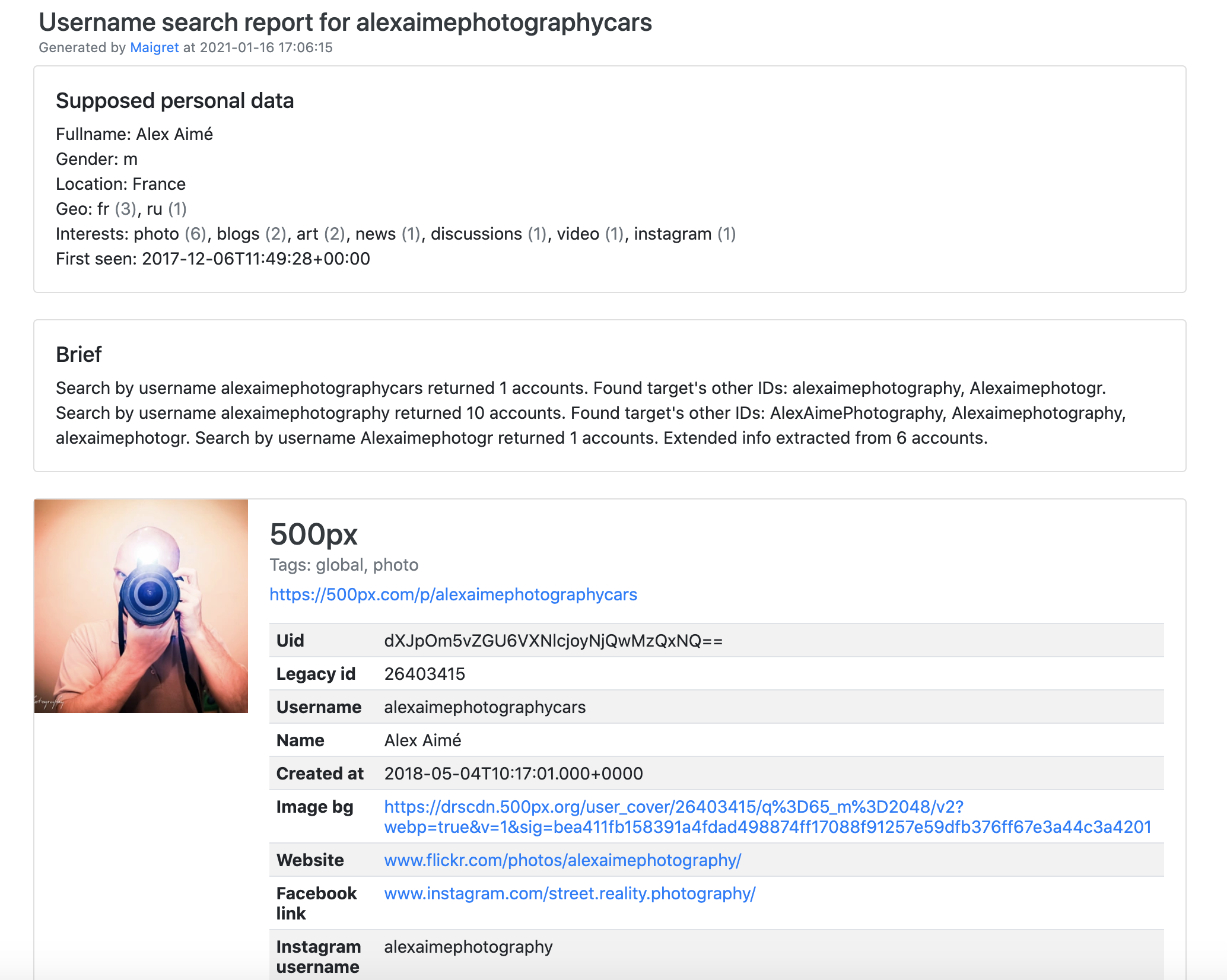
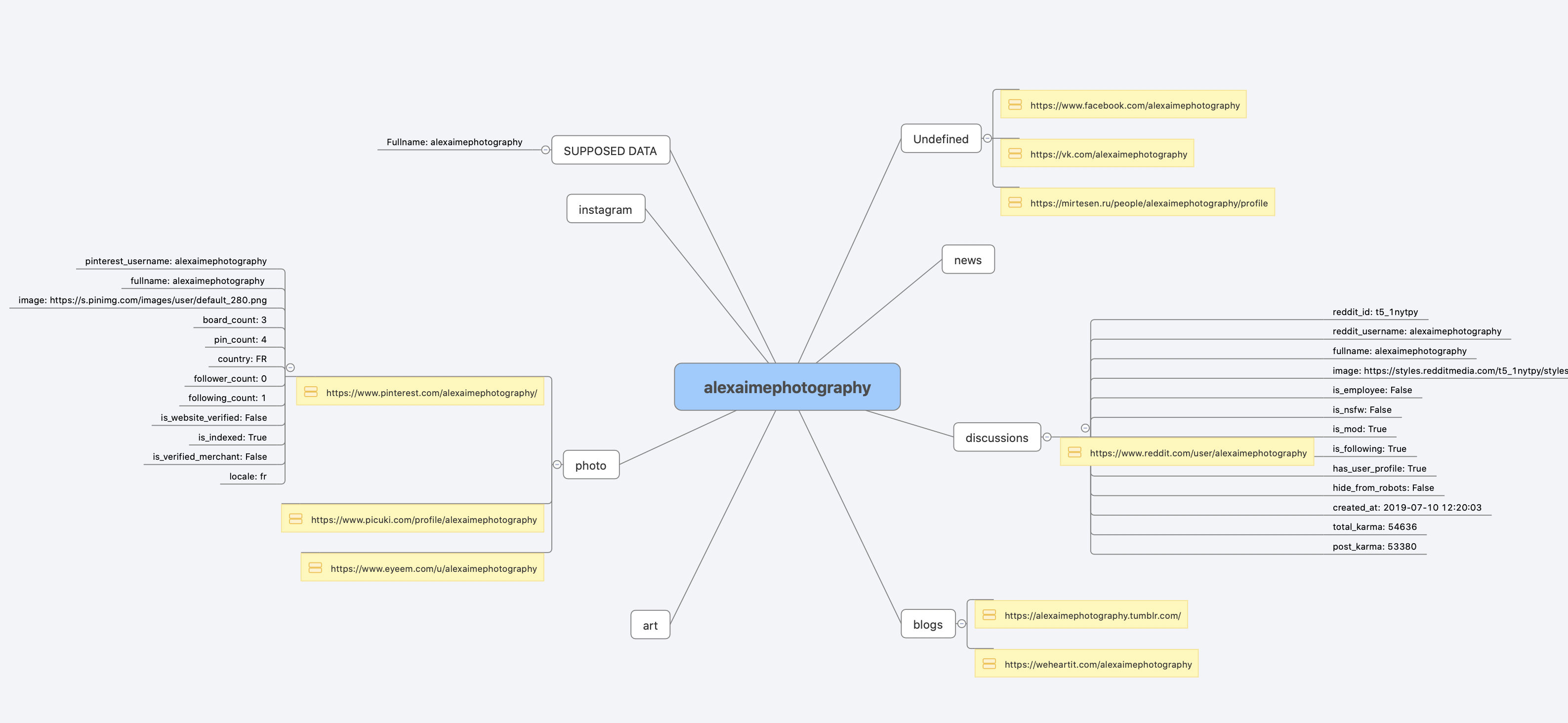
[PDF report](https://raw.githubusercontent.com/soxoj/maigret/main/static/report_alexaimephotographycars.pdf), [HTML report](https://htmlpreview.github.io/?https://raw.githubusercontent.com/soxoj/maigret/main/static/report_alexaimephotographycars.html)
|
|
|
|
|
|
|
|
|
|
|
|
[Full console output](https://raw.githubusercontent.com/soxoj/maigret/main/static/recursive_search.md)
|
|
|
|
## Installation
|
|
|
|
Already ran the [In one minute](#one-minute) steps? You're set. Below are alternative methods.
|
|
|
|
Don't want to install anything? Use the [Telegram bot](https://t.me/maigret_search_bot).
|
|
|
|
### Windows
|
|
|
|
Download a standalone EXE from [Releases](https://github.com/soxoj/maigret/releases). Video guide: https://youtu.be/qIgwTZOmMmM.
|
|
|
|
<a id="cloud-shells"></a>
|
|
### Cloud Shells
|
|
|
|
Run Maigret in the browser via cloud shells or Jupyter notebooks:
|
|
|
|
<a href="https://console.cloud.google.com/cloudshell/open?git_repo=https://github.com/soxoj/maigret&tutorial=cloudshell-tutorial.md"><img src="https://user-images.githubusercontent.com/27065646/92304704-8d146d80-ef80-11ea-8c29-0deaabb1c702.png" alt="Open in Cloud Shell" height="50"></a>
|
|
<a href="https://repl.it/github/soxoj/maigret"><img src="https://replit.com/badge/github/soxoj/maigret" alt="Run on Replit" height="50"></a>
|
|
|
|
<a href="https://colab.research.google.com/gist/soxoj/879b51bc3b2f8b695abb054090645000/maigret-collab.ipynb"><img src="https://colab.research.google.com/assets/colab-badge.svg" alt="Open In Colab" height="45"></a>
|
|
<a href="https://mybinder.org/v2/gist/soxoj/9d65c2f4d3bec5dd25949197ea73cf3a/HEAD"><img src="https://mybinder.org/badge_logo.svg" alt="Open In Binder" height="45"></a>
|
|
|
|
### Local installation (pip)
|
|
|
|
```bash
|
|
# install from pypi
|
|
pip3 install maigret
|
|
|
|
# usage
|
|
maigret username
|
|
```
|
|
|
|
### From source
|
|
|
|
```bash
|
|
# or clone and install manually
|
|
git clone https://github.com/soxoj/maigret && cd maigret
|
|
|
|
# build and install
|
|
pip3 install .
|
|
|
|
# usage
|
|
maigret username
|
|
```
|
|
|
|
### Docker
|
|
|
|
Two image variants are published:
|
|
|
|
- `soxoj/maigret:latest` — CLI mode (default)
|
|
- `soxoj/maigret:web` — auto-launches the [web interface](#web-interface)
|
|
|
|
```bash
|
|
# official image (CLI)
|
|
docker pull soxoj/maigret
|
|
|
|
# CLI usage
|
|
docker run -v /mydir:/app/reports soxoj/maigret:latest username --html
|
|
|
|
# Web UI (open http://localhost:5000)
|
|
docker run -p 5000:5000 soxoj/maigret:web
|
|
|
|
# Web UI on a custom port
|
|
docker run -e PORT=8080 -p 8080:8080 soxoj/maigret:web
|
|
|
|
# manual build
|
|
docker build -t maigret . # CLI image (default target)
|
|
docker build --target web -t maigret-web . # Web UI image
|
|
```
|
|
|
|
### Troubleshooting
|
|
|
|
Build errors? See the [troubleshooting guide](https://maigret.readthedocs.io/en/latest/installation.html#troubleshooting).
|
|
|
|
## Usage
|
|
|
|
### Examples
|
|
|
|
```bash
|
|
# make HTML, PDF, and Xmind8 reports
|
|
maigret user --html
|
|
maigret user --pdf
|
|
maigret user --xmind #Output not compatible with xmind 2022+
|
|
|
|
# machine-readable exports
|
|
maigret user --json ndjson # newline-delimited JSON (also: --json simple)
|
|
maigret user --csv
|
|
maigret user --txt
|
|
maigret user --graph # interactive D3 graph (HTML)
|
|
|
|
# search on sites marked with tags photo & dating
|
|
maigret user --tags photo,dating
|
|
|
|
# search on sites marked with tag us
|
|
maigret user --tags us
|
|
|
|
# search for three usernames on all available sites
|
|
maigret user1 user2 user3 -a
|
|
```
|
|
|
|
Run `maigret --help` for all options. Docs: [CLI options](https://maigret.readthedocs.io/en/latest/command-line-options.html), [more examples](https://maigret.readthedocs.io/en/latest/usage-examples.html). Running into 403s or timeouts? See [TROUBLESHOOTING.md](TROUBLESHOOTING.md).
|
|
|
|
<a id="web-interface"></a>
|
|
### Web interface
|
|
|
|
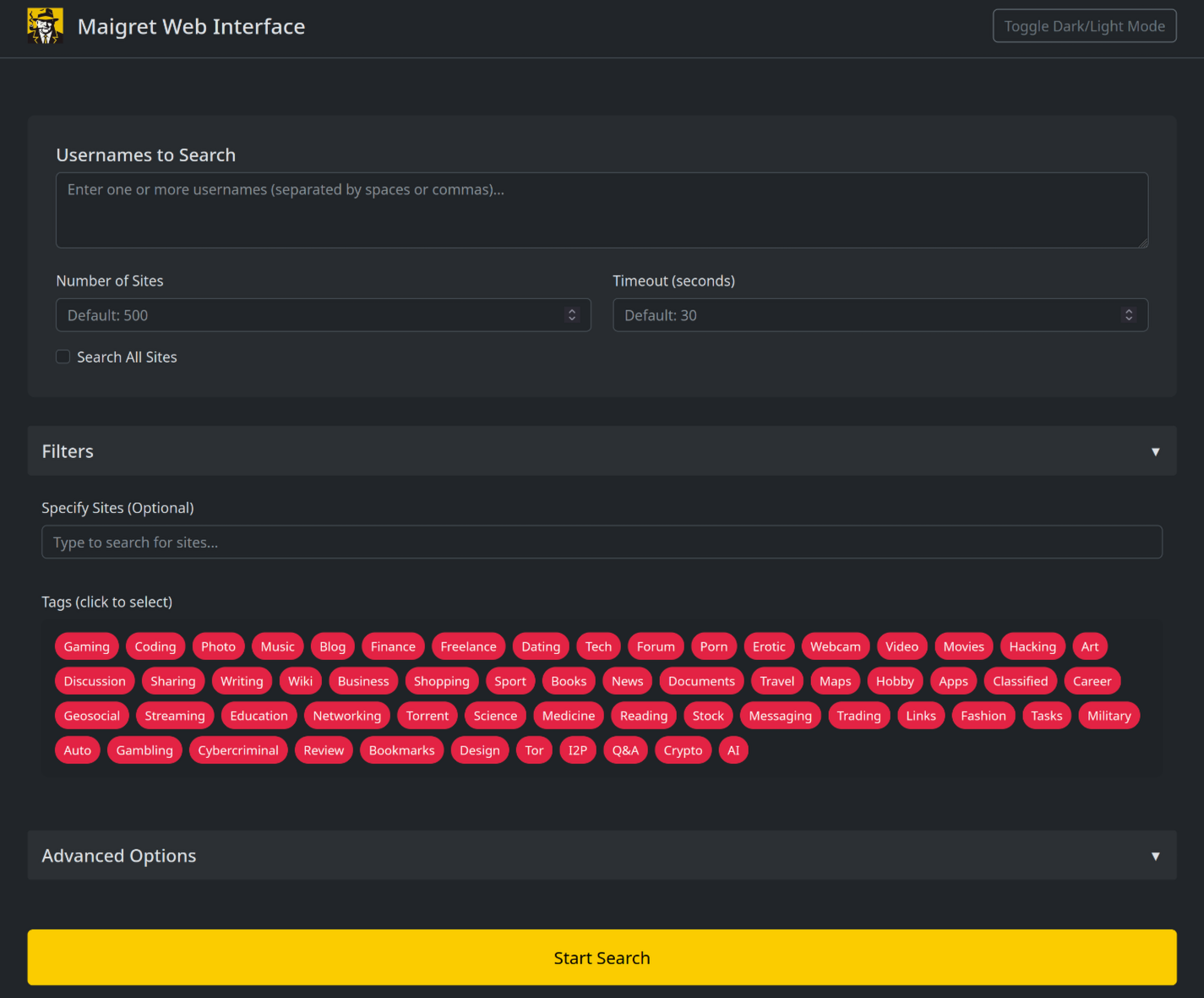
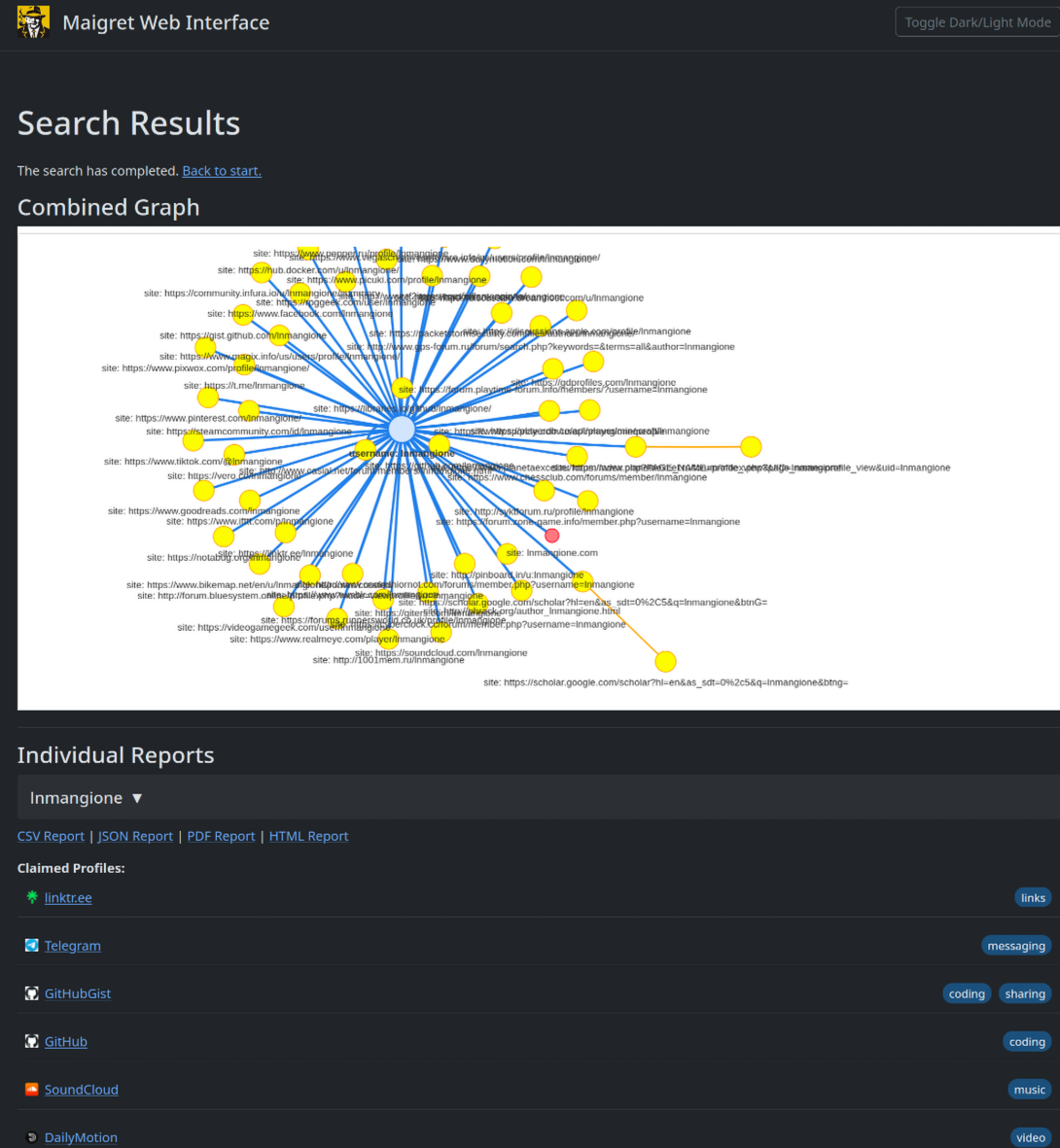
Maigret has a built-in web UI with a results graph and downloadable reports.
|
|
|
|
<details>
|
|
<summary>Web Interface Screenshots</summary>
|
|
|
|
|
|
|
|
|
|
|
|
</details>
|
|
|
|
```console
|
|
maigret --web 5000
|
|
```
|
|
|
|
Open http://127.0.0.1:5000, enter a username, and view results.
|
|
|
|
### Python library
|
|
|
|
**Maigret can be embedded in your own Python projects.** The CLI is a thin wrapper around an async function you can call directly — build custom pipelines, feed results into your own tooling, or run it inside a larger OSINT workflow.
|
|
|
|
See the full [library usage guide](https://maigret.readthedocs.io/en/latest/library-usage.html) for a working example, async patterns, and how to filter sites by tag.
|
|
|
|
### Useful CLI flags
|
|
|
|
- `--parse URL` — parse a profile page, extract IDs/usernames, and use them to kick off a recursive search.
|
|
- `--permute` — generate likely username variants from two or more inputs (e.g. `john doe` → `johndoe`, `j.doe`, …) and search for all of them.
|
|
- `--self-check [--auto-disable]` — verify `usernameClaimed` / `usernameUnclaimed` pairs against live sites for maintainers auditing the database.
|
|
|
|
### Tor / I2P / proxies
|
|
|
|
Maigret can route checks through a proxy, Tor, or I2P — useful for `.onion` / `.i2p` sites and for bypassing WAFs that block datacenter IPs.
|
|
|
|
```bash
|
|
# any HTTP/SOCKS proxy
|
|
maigret user --proxy socks5://127.0.0.1:1080
|
|
|
|
# Tor (default gateway socks5://127.0.0.1:9050)
|
|
maigret user --tor-proxy socks5://127.0.0.1:9050
|
|
|
|
# I2P (default gateway http://127.0.0.1:4444)
|
|
maigret user --i2p-proxy http://127.0.0.1:4444
|
|
```
|
|
|
|
Start your Tor / I2P daemon before running the command — Maigret does not manage these gateways.
|
|
|
|
## Contributing
|
|
|
|
Add or fix new sites surgically in `data.json` (no `json.load`/`json.dump`), then run `./utils/update_site_data.py` to regenerate `sites.md` and the database metadata, and open a pull request. For more details, see the [CONTRIBUTING guide](https://github.com/soxoj/maigret/blob/main/CONTRIBUTING.md) and [development docs](https://maigret.readthedocs.io/en/latest/development.html). Release history: [CHANGELOG.md](CHANGELOG.md).
|
|
|
|
## Commercial Use
|
|
|
|
The open-source Maigret is MIT-licensed and free for commercial use without restriction — but site checks break over time and need active maintenance.
|
|
|
|
For serious commercial use — with a **daily-updated site database** or a **username-check API** — reach out: 📧 [maigret@soxoj.com](mailto:maigret@soxoj.com)
|
|
|
|
- Private site database — 5 000+ sites, updated daily (separate from the public open-source database)
|
|
- Username check API — integrate Maigret into your product
|
|
|
|
## About
|
|
|
|
### Disclaimer
|
|
|
|
**For educational and lawful purposes only.** You are responsible for complying with all applicable laws (GDPR, CCPA, etc.) in your jurisdiction. The authors bear no responsibility for misuse.
|
|
|
|
### Feedback
|
|
|
|
[Open an issue](https://github.com/soxoj/maigret/issues) · [GitHub Discussions](https://github.com/soxoj/maigret/discussions) · [Telegram](https://t.me/soxoj)
|
|
|
|
### SOWEL classification
|
|
|
|
OSINT techniques used:
|
|
- [SOTL-2.2. Search For Accounts On Other Platforms](https://sowel.soxoj.com/other-platform-accounts)
|
|
- [SOTL-6.1. Check Logins Reuse To Find Another Account](https://sowel.soxoj.com/logins-reuse)
|
|
- [SOTL-6.2. Check Nicknames Reuse To Find Another Account](https://sowel.soxoj.com/nicknames-reuse)
|
|
|
|
### License
|
|
|
|
MIT © [Maigret](https://github.com/soxoj/maigret)
|