 [](https://github.com/komodorio/helm-dashboard/issues)      [](https://github.com/komodorio/helm-dashboard)
[](screenshot.png)
## Description
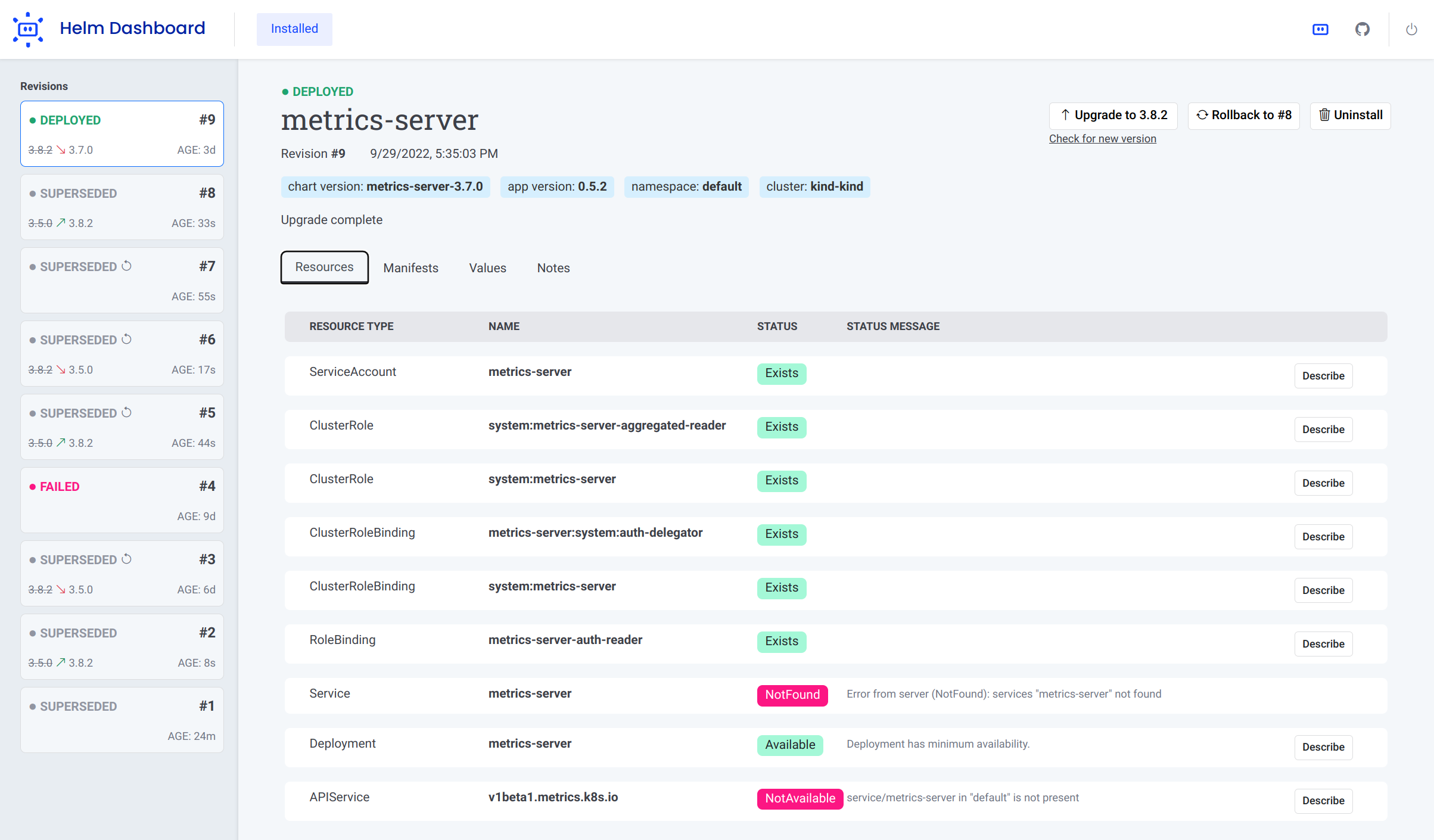
_Helm Dashboard_ is an **open-source project** which offers a UI-driven way to view the installed Helm charts, see their revision history and
corresponding k8s resources. Also, you can perform simple actions like roll back to a revision or upgrade to newer
version.
This project is part of [Komodor's](https://komodor.com/?utm_campaign=Helm-Dash&utm_source=helm-dash-gh) vision of
helping Kubernetes users to navigate and troubleshoot their clusters, the project is **NOT** an offical project by the [helm team](https://helm.sh/).
Some of the key capabilities of the tool:
- See all installed charts and their revision history
- See manifest diff of the past revisions
- Browse k8s resources resulting from the chart
- Easy rollback or upgrade version with a clear and easy manifest diff
- Integration with popular problem scanners
- Easy switch between multiple clusters
## Setup
### Using Helm plugin manager
To install the plugin, simply run Helm command:
```shell
helm plugin install https://github.com/komodorio/helm-dashboard.git
```
To update the plugin to the latest version, run:
```shell
helm plugin update dashboard
```
To uninstall, run:
```shell
helm plugin uninstall dashboard
```
To use the plugin, your machine needs to have working `helm` and also `kubectl` commands. Helm version 3.4.0+ is required.
After installing, start the UI by running:
```shell
helm dashboard
```
The command above will launch the local Web server and will open the UI in new browser tab. The command will hang
waiting for you to terminate it in command-line or web UI.
You can see the list of available command-line flags by running `helm dashboard --help`.
By default, the web server is only available locally. You can change that by specifying `HD_BIND` environment variable
to the desired value. For example, `0.0.0.0` would bind to all IPv4 addresses or `[::0]` would be all IPv6 addresses.
This can also be specified using flag `--bind `, for example `--bind=0.0.0.0` or `--bind 0.0.0.0`.
> Precedence order: flag `--bind=` > env `HD_BIND=` > default value `localhost`
If your port 8080 is busy, you can specify a different port to use via `--port ` command-line flag.
If you need to limit the operations to a specific namespace, please use `--namespace=...` in your command-line.
If you don't want browser tab to automatically open, add `--no-browser` flag in your command line.
If you want to increase the logging verbosity and see all the debug info, use the `--verbose` flag.
> Disclaimer: For the sake of improving the project quality, there is user analytics collected by the tool. You can disable this collecting with `--no-analytics` option. The collection is done via DataDog RUM and Heap Analytics. Only the anonymous data is collected, no sensitive information is used.
### Deploying Helm Dashboard on Kubernetes
The official helm chart is [available here](https://github.com/komodorio/helm-charts/blob/master/charts/helm-dashboard)
### Manual Installation
Download the appropriate [release package](https://github.com/komodorio/helm-dashboard/releases) for your platform, unpack it and just run `dashboard` binary from it.
## Execute Helm tests
For all the release(s) (istalled helm charts), you can execute helm tests for that release. For the tests to execute successfully, you need to have existing tests for that helm chart
You can execute `helm test` for the specific release as below:
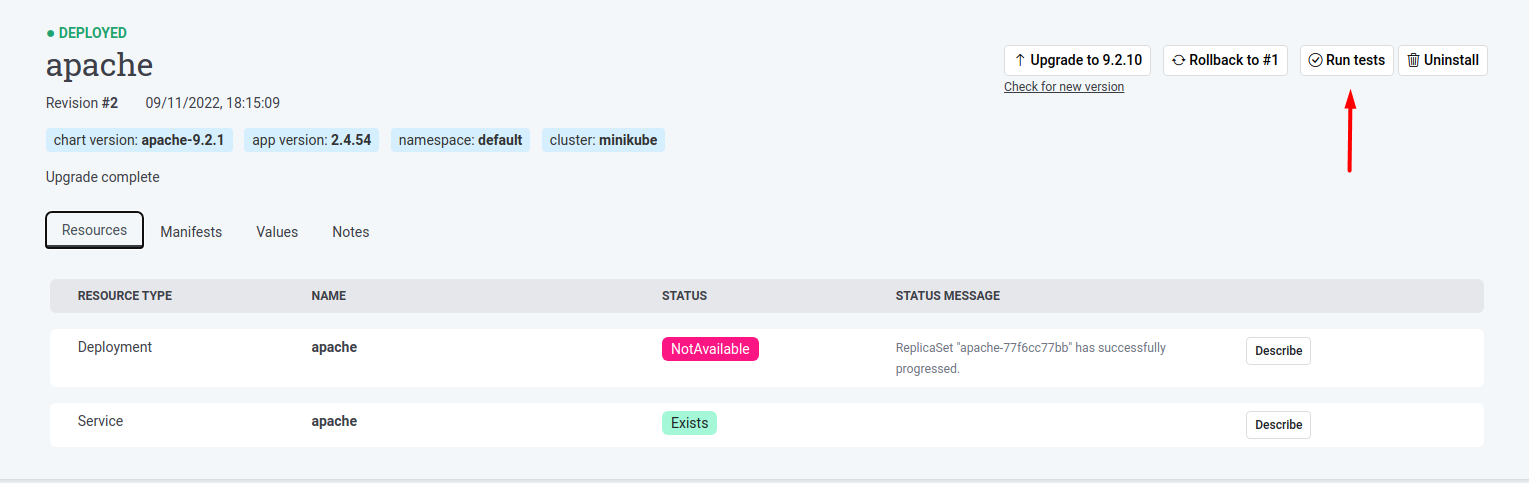
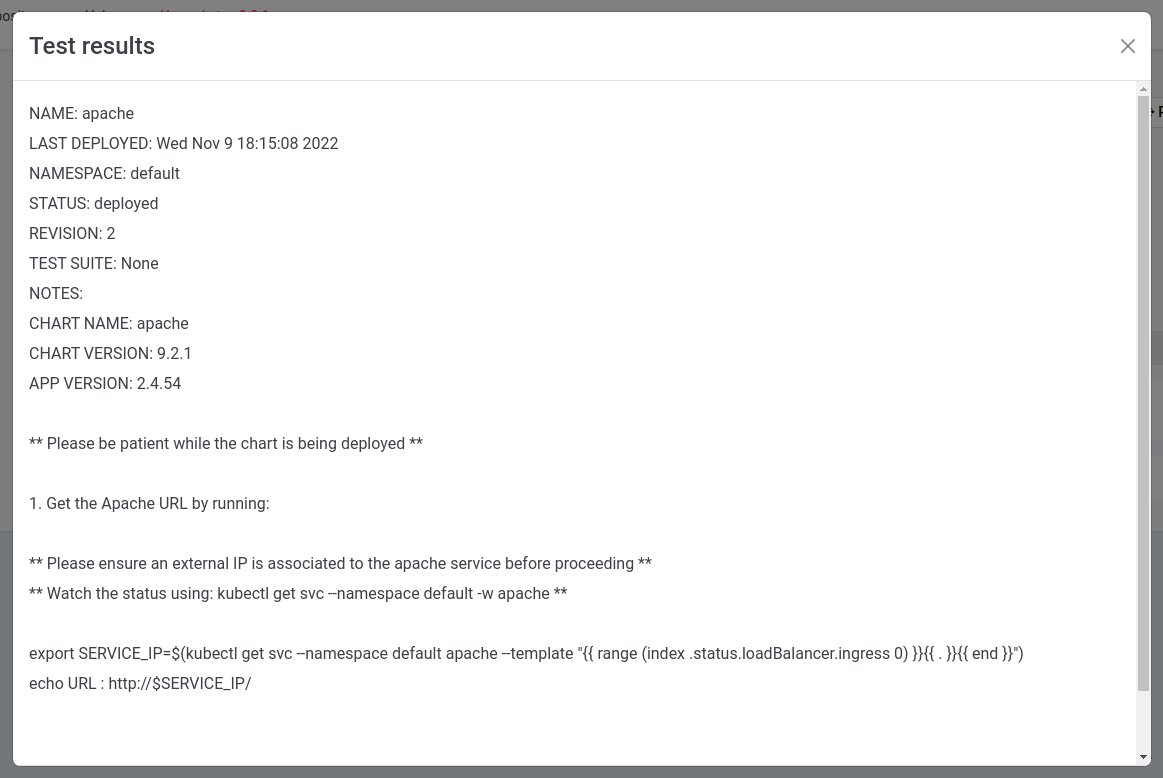
The result of executed `helm test` for the release will be disapled as below:
## Scanner Integrations
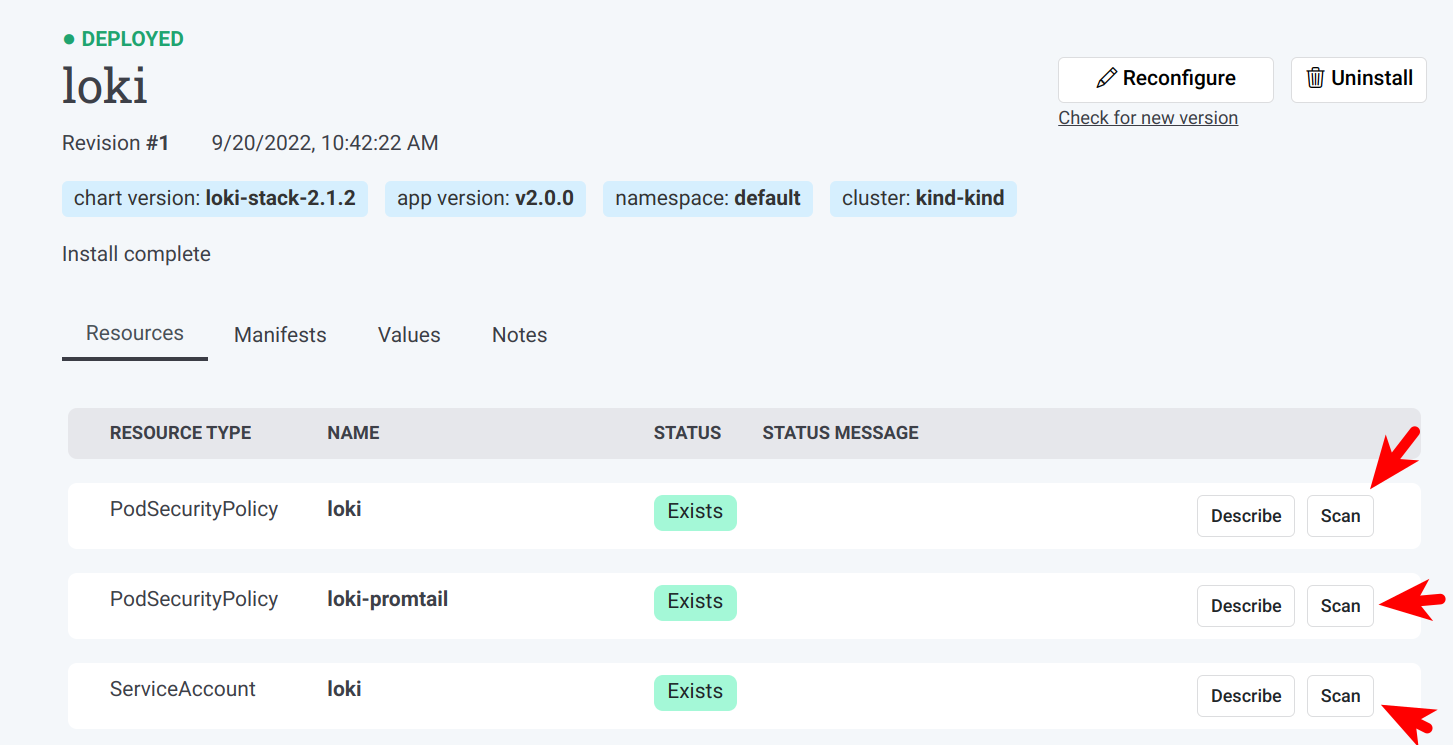
Upon startup, Helm Dashboard detects the presence of [Trivy](https://github.com/aquasecurity/trivy)
and [Checkov](https://github.com/bridgecrewio/checkov) scanners. When available, these scanners are offered on k8s
resources page, as well as install/upgrade preview page.
You can request scanning of the specific k8s resource in your cluster:
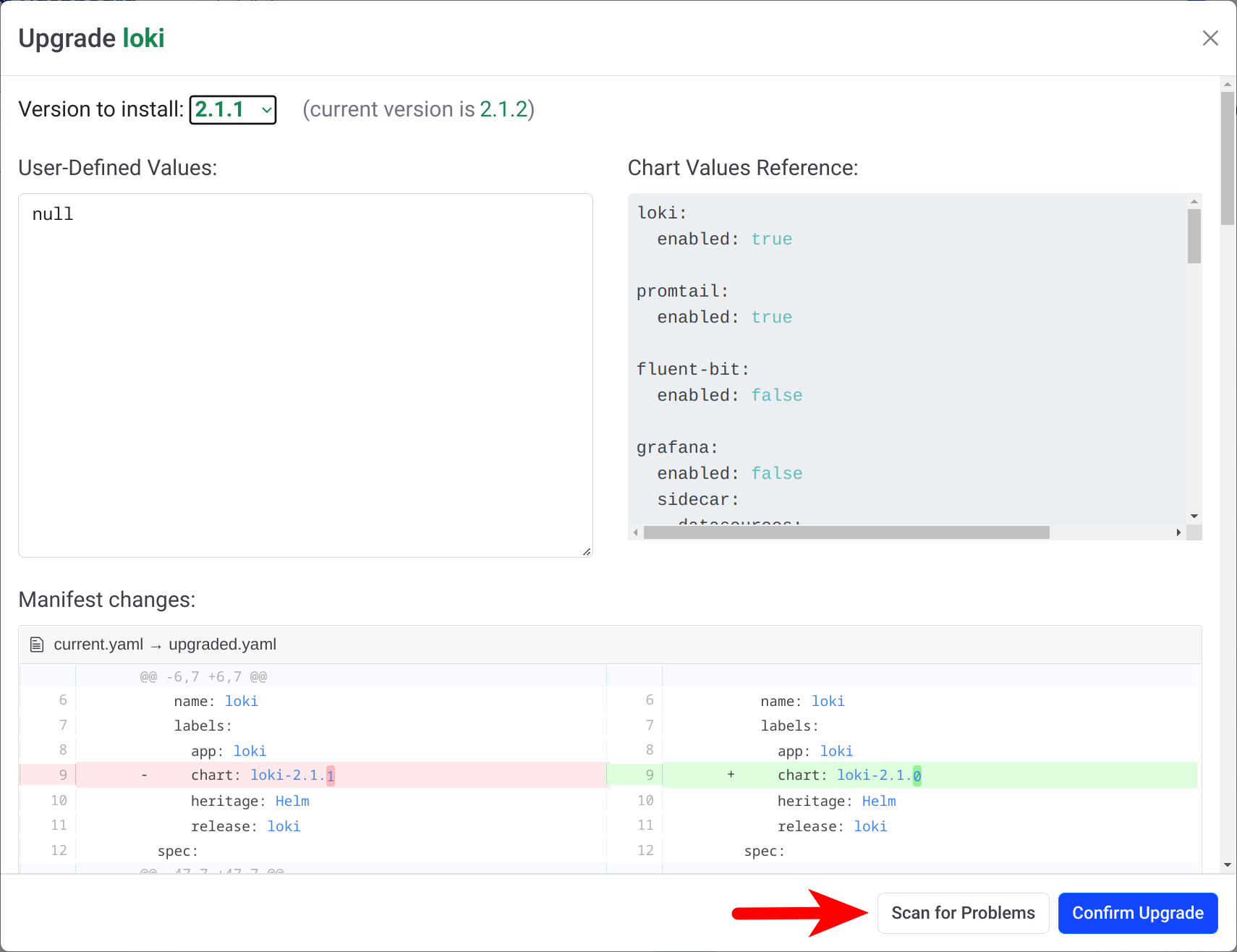
If you want to validate the k8s manifest prior to installing/reconfiguring a Helm chart, look for "Scan for Problems"
button at the bottom of the dialog:
## Support Channels
We have two main channels for supporting the Helm Dashboard
users: [Slack community](https://komodorkommunity.slack.com) for general conversations
and [GitHub issues](https://github.com/komodorio/helm-dashboard/issues) for real bugs.
## Contributing
Kindly read our [Contributing Guide](CONTRIBUTING.md) to learn and understand about our development process, how to propose bug fixes and improvements, and how to build and test your changes to Helm Dashboard.
## Contributors
## Local Dev Testing
Prerequisites: `helm` and `kubectl` binaries installed and operational.
There is a need to build binary for plugin to function, run:
```shell
go build -o bin/dashboard .
```
You can just run the `bin/dashboard` binary directly, it will just work.
To install, checkout the source code and run from source dir:
```shell
helm plugin install .
```
Local installation of plugin just creates a symlink, so making the changes and rebuilding the binary would not require
to
reinstall a plugin.
To use the plugin, run in your terminal:
```shell
helm dashboard
```
Then, use the web UI.

 ](screenshot.png)
## Description
_Helm Dashboard_ is an **open-source project** which offers a UI-driven way to view the installed Helm charts, see their revision history and
corresponding k8s resources. Also, you can perform simple actions like roll back to a revision or upgrade to newer
version.
This project is part of [Komodor's](https://komodor.com/?utm_campaign=Helm-Dash&utm_source=helm-dash-gh) vision of
helping Kubernetes users to navigate and troubleshoot their clusters, the project is **NOT** an offical project by the [helm team](https://helm.sh/).
Some of the key capabilities of the tool:
- See all installed charts and their revision history
- See manifest diff of the past revisions
- Browse k8s resources resulting from the chart
- Easy rollback or upgrade version with a clear and easy manifest diff
- Integration with popular problem scanners
- Easy switch between multiple clusters
## Setup
### Using Helm plugin manager
To install the plugin, simply run Helm command:
```shell
helm plugin install https://github.com/komodorio/helm-dashboard.git
```
To update the plugin to the latest version, run:
```shell
helm plugin update dashboard
```
To uninstall, run:
```shell
helm plugin uninstall dashboard
```
To use the plugin, your machine needs to have working `helm` and also `kubectl` commands. Helm version 3.4.0+ is required.
After installing, start the UI by running:
```shell
helm dashboard
```
The command above will launch the local Web server and will open the UI in new browser tab. The command will hang
waiting for you to terminate it in command-line or web UI.
You can see the list of available command-line flags by running `helm dashboard --help`.
By default, the web server is only available locally. You can change that by specifying `HD_BIND` environment variable
to the desired value. For example, `0.0.0.0` would bind to all IPv4 addresses or `[::0]` would be all IPv6 addresses.
This can also be specified using flag `--bind
](screenshot.png)
## Description
_Helm Dashboard_ is an **open-source project** which offers a UI-driven way to view the installed Helm charts, see their revision history and
corresponding k8s resources. Also, you can perform simple actions like roll back to a revision or upgrade to newer
version.
This project is part of [Komodor's](https://komodor.com/?utm_campaign=Helm-Dash&utm_source=helm-dash-gh) vision of
helping Kubernetes users to navigate and troubleshoot their clusters, the project is **NOT** an offical project by the [helm team](https://helm.sh/).
Some of the key capabilities of the tool:
- See all installed charts and their revision history
- See manifest diff of the past revisions
- Browse k8s resources resulting from the chart
- Easy rollback or upgrade version with a clear and easy manifest diff
- Integration with popular problem scanners
- Easy switch between multiple clusters
## Setup
### Using Helm plugin manager
To install the plugin, simply run Helm command:
```shell
helm plugin install https://github.com/komodorio/helm-dashboard.git
```
To update the plugin to the latest version, run:
```shell
helm plugin update dashboard
```
To uninstall, run:
```shell
helm plugin uninstall dashboard
```
To use the plugin, your machine needs to have working `helm` and also `kubectl` commands. Helm version 3.4.0+ is required.
After installing, start the UI by running:
```shell
helm dashboard
```
The command above will launch the local Web server and will open the UI in new browser tab. The command will hang
waiting for you to terminate it in command-line or web UI.
You can see the list of available command-line flags by running `helm dashboard --help`.
By default, the web server is only available locally. You can change that by specifying `HD_BIND` environment variable
to the desired value. For example, `0.0.0.0` would bind to all IPv4 addresses or `[::0]` would be all IPv6 addresses.
This can also be specified using flag `--bind